
Copy the command below to clone the repository to your machine.
A lightweight AI Agent runtime written in Go.
Single binary - Any LLM - Multi-agent - Sandbox - Cloud-ready
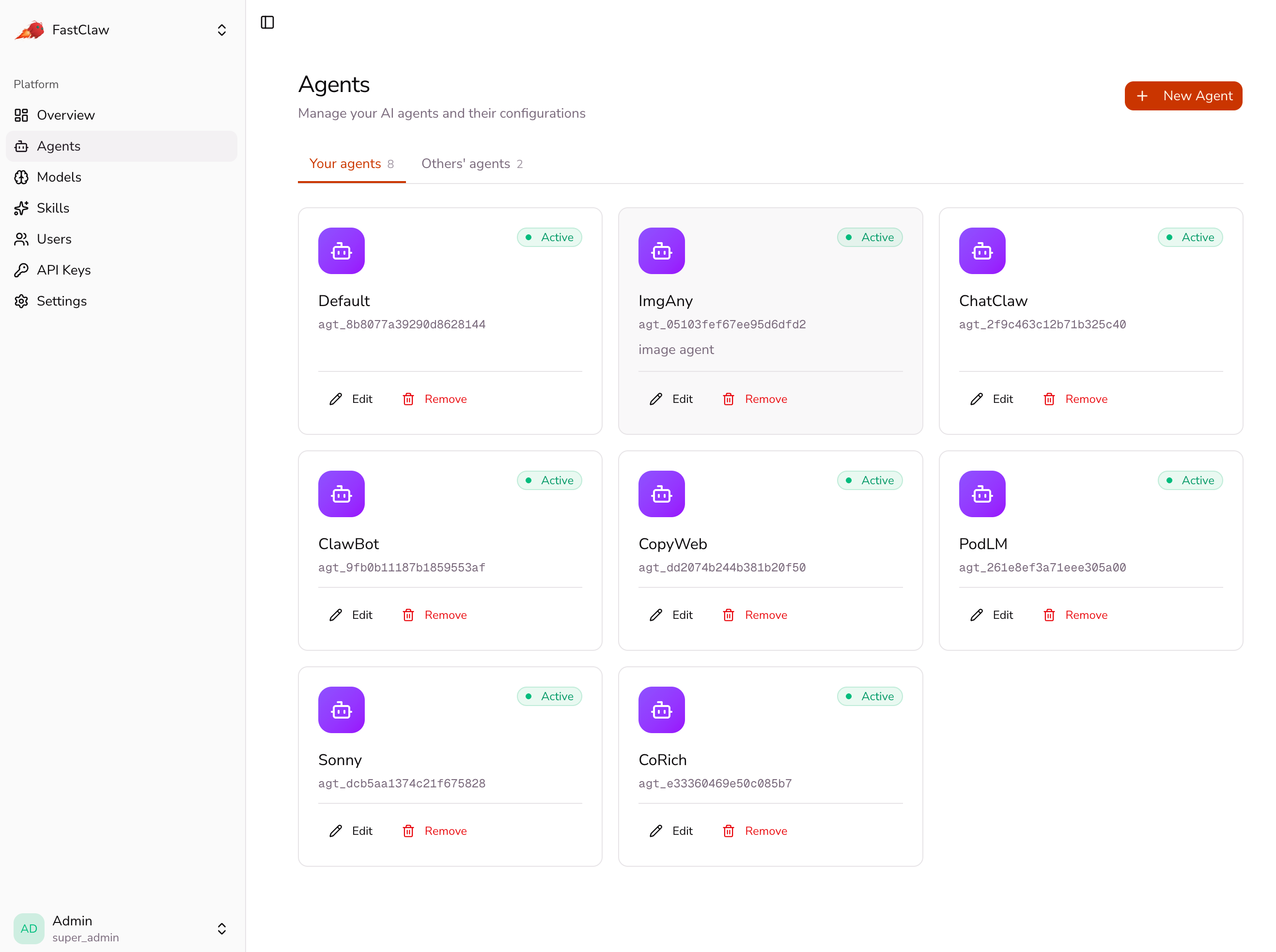
Platform admin: agents, models, skills, users, API keys
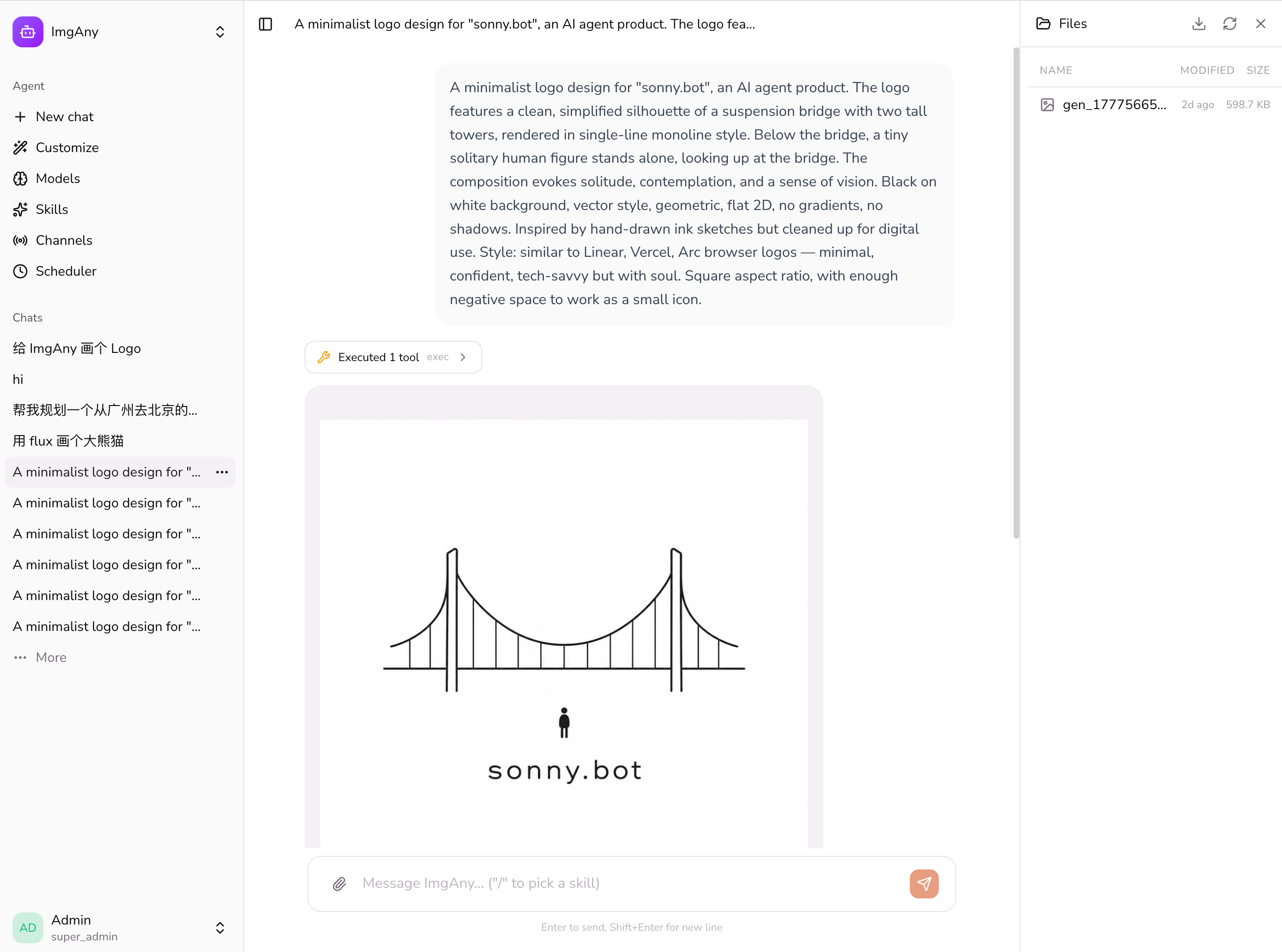
Per-agent management: chat, customize, scoped models / skills / channels / scheduler
FastClaw is an Agent Factory — it creates, manages, and runs AI agents. Each agent has its own personality (SOUL.md), memory, skills, and tools. FastClaw handles the LLM communication, tool execution, sandbox isolation, and session management.
# Install (drops the binary into ~/.local/bin and adds it to PATH)
curl -fsSL https://raw.githubusercontent.com/fastclaw-ai/fastclaw/main/install.sh | bash
fastclaw
# Opens setup wizard → configure LLM provider → creates default agent.
# Foreground mode; ^C to stop. Use `fastclaw daemon start` to run in
# the background, or `fastclaw daemon install` to register a
# launchd / systemd service.
Open http://localhost:18953 and login with your admin token.
Non-admin users get scoped access to Models, API Keys, and
Settings (General + Account) out of the box. They see admin-shared
resources asInheritedand can layer their own private overlays on
top — same inheritance pattern the agent runtime uses.
Click an agent to enter its management panel:
agents.defaults.model overrides the system default)create_cron_job ("每天 9 点提醒我", "5 分钟后叫我"); pause / delete from the UISharing. Each agent has a Public access toggle in the Edit dialog
(default off). When on, anyone with the chat URL — /agents/{id}/chat/
— can chat with the agent under their own account; sessions / memory /
USER.md partition per chatter, while SOUL / IDENTITY / skills are
shared from the owner's row. When off, only the owner (or super_admin)
can access it.
~/.fastclaw/
  fastclaw.db                # SQLite default — users, agents, sessions,
                             # apikeys, configs, agent_files all live here
  skills/                    # Shared skills (bundled + installed)
  agents/
    <agentId>/agent/skills/        # Agent-private skills (filesystem only)
The database is the source of truth for everything except skill folders
on disk. SQLite is the default; point FASTCLAW_STORAGE_DSN at Postgres
for multi-pod deployments.
There is no fastclaw.json. Bootstrap settings (port, bind, storage
DSN, sandbox backend) come from FASTCLAW_* env vars; everything user-
facing (providers, channels, settings, defaults) lives in the configs
table and is edited through the dashboard or fastclaw agents config.
| Data | Belongs to | Backing store |
|---|---|---|
| Agent records, SOUL.md / IDENTITY.md / MEMORY.md / agent.json | Agent | DB (agent_files table) |
| Sessions (chat history) | Agent × user | DB (sessions table) |
| API keys, users, scoped configs (providers/channels/settings) | Platform | DB |
| Skills | Agent / Global | Filesystem (skills/, agents/<id>/agent/skills/) |
| User accounts, billing | Application | Your app (ChatClaw, etc.) |
| Output files | Application | Your app / S3 |
getMe, Discord /users/@me, Slack auth.test)/v1/chat/completions (streaming)docs/upstream-api.md/api/chat/stream (SSE)/api/chat/subscribe (SSE) — surfaces cron-fired and other async replies into the open chat panel without a refresh/api/chat/sessions/api/agents (?all=true returns the cross-tenant view, admin-only)/api/agents/{id}/cron (list / toggle / delete)/api/config/api/skills/install (ClawHub + GitHub)/api/apikeys (per-user; tiers: admin / user / agent)/api/users (admin) — top-level CRUD + nested/api/users/{id}/apikeys and /api/users/{id}/agents foragents endpoint acceptsforkFrom to clone an existing agent's identity (SOUL / IDENTITY /agent_quota-1 = unlimited, 0 = admin-provisioned only).POST /v1/users — third-party apps mint a stable fastclaw user_id per end-user, idempotent on (api_key, external_id). Or pass user on /v1/chat/completions (or X-Fastclaw-End-User header) for lazy mint on first callBootstrap is env-only. Everything that needs to change at runtime
(providers, models, channels, defaults, sandbox toggle) lives in the
database and is edited through the dashboard or fastclaw agents config.
| Env var | Default | What it does |
|---|---|---|
FASTCLAW_HOME |
~/.fastclaw |
Where the SQLite DB and skill folders live. |
FASTCLAW_PORT |
18953 |
Gateway HTTP port. |
FASTCLAW_BIND |
loopback |
loopback (127.0.0.1) or all (0.0.0.0). |
FASTCLAW_STORAGE_TYPE |
sqlite |
sqlite or postgres. |
FASTCLAW_STORAGE_DSN |
empty | Postgres DSN, e.g. postgres://u:p@host:5432/db?sslmode=disable. Empty = sqlite at $FASTCLAW_HOME/fastclaw.db. |
FASTCLAW_STORAGE_AUTO_MIGRATE |
true |
Apply schema migrations on boot. |
FASTCLAW_REDIS_ENABLED |
false |
Enable Redis-backed channel leases and Redis Stream message bus. Setting FASTCLAW_REDIS_ADDR also enables it. |
FASTCLAW_REDIS_ADDR |
127.0.0.1:6379 when enabled |
Redis address used by multi-replica channel locks and shared inbound/outbound delivery streams. |
FASTCLAW_REDIS_USERNAME |
empty | Redis ACL username, if required. |
FASTCLAW_REDIS_PASSWORD |
empty | Redis password, if required. |
FASTCLAW_REDIS_DB |
0 |
Redis logical database number. |
FASTCLAW_REDIS_PREFIX |
fastclaw |
Prefix for Redis stream and lease keys. |
FASTCLAW_SANDBOX_ENABLED |
dashboard | Override the Settings → Runtime toggle. |
FASTCLAW_SANDBOX_BACKEND |
dashboard | docker or e2b. |
FASTCLAW_SANDBOX_IMAGE |
dashboard | Docker image (Docker backend) or template id (E2B). |
FASTCLAW_OBJECT_STORE_* |
unset | S3-compatible blob store for distributed deploys (multi-pod skill / file hydration). |
FASTCLAW_LOG_LEVEL |
info |
debug / info / warn / error. |
Anything not on this list — providers, models, default model, skill
catalog, channels, plugin config, scheduler — is configured at runtime
through the web UI (http://localhost:18953) or the CLI (fastclaw agents config, fastclaw provider, fastclaw skill).
fastclaw                    # foreground (^C to stop)
fastclaw daemon start       # background (logs at ~/.fastclaw/daemon.log)
fastclaw daemon status
fastclaw daemon stop
fastclaw daemon install     # register as a launchd / systemd service
fastclaw agents …)The fastclaw agents subcommand is a thin convenience wrapper around the
same store the dashboard uses. Agents you create here show up in the web
UI and vice-versa — there's only ever one fastclaw deployment perFASTCLAW_HOME.
# Zero to a chattable agent in one command. On a fresh install this
# creates an `admin` user (random password printed once) and starts
# the gateway daemon if it isn't already running.
fastclaw agents init alpha \
  --provider openai \
  --model openai/gpt-4o-mini \
  --api-key-env OPENAI_API_KEY

# Set per-agent overrides (model, temperature, sandbox, …).
fastclaw agents config alpha set temperature 0.7
fastclaw agents config alpha set sandbox.enabled true

# Upload the agent's identity files.
fastclaw agents files put alpha SOUL.md ./SOUL.md
fastclaw agents files put alpha IDENTITY.md ./IDENTITY.md

# Inspect.
fastclaw agents ls
fastclaw agents config alpha get
fastclaw agents files ls alpha

# Tear down.
fastclaw agents rm alpha
The CLI opens the operator's store directly (sqlite at~/.fastclaw/fastclaw.db, or whatever FASTCLAW_STORAGE_DSN points at)
and writes through the same code paths the gateway uses. It does not
require the gateway to be running — but agents init will spin one up
in the background so a fresh agent is immediately reachable athttp://localhost:18953. Subsequent CLI writes (config set,files put, rm, init re-runs) send SIGHUP to the running gateway
so it hot-reloads without restart. Windows lacks SIGHUP delivery, so
the CLI falls back to a hint asking you to run fastclaw daemon restart.
The default owner is the admin user. On an empty databaseagents init creates that account with a generated password (printed
once); on a populated database it expects admin to exist or--username to point at an existing user.
CLI commands accept either a display name or an agt_… id:
fastclaw agents config alpha get — by display name (must be unique)fastclaw agents config agt_d3c4a5… get — by idIf the same text matches one agent's id and a different agent's display
name, the CLI reports an ambiguity instead of guessing.
When you create an agent via agents init <name>, the name is the
display name and the id is auto-generated. To update an agent that was
created via the dashboard, pass its id explicitly:
fastclaw agents init "Cool Agent" --id agt_d3c4a5...
Per-agent (saved at scope=agent under the agent's id):
model, temperature, maxTokens, thinking, policysandbox, sandbox.enabled, sandbox.backend, sandbox.image, sandbox.networkSystem-wide (saved at scope=system):
plugins, plugins.<name>skills.install, skills.entries, skillsLearnertools.providers, tools.categoriesobjectstore, taskqueue, heartbeat, memory, privacy, hooks, teamsProvider configs live in scope=system and are addressed asprovider.<name>.<field>:
fastclaw agents config alpha set provider.openai.apiKeyEnv OPENAI_API_KEY
fastclaw agents config alpha set provider.openrouter.apiBase https://openrouter.ai/api/v1
fastclaw agents config alpha set provider.openai.model gpt-4o      # adds; idempotent
fastclaw agents config alpha set provider.openai.models '[]'        # explicit clear
Provider presets ship for openai, openrouter, anthropic, ollama,groq, deepseek, mistral — --api-key-env populates apiKey from
the named environment variable, the rest comes from the preset.
The CLI reads and writes the same agent_files table the dashboard's
file editor uses. Allowlisted filenames: SOUL.md, IDENTITY.md,USER.md, BOOTSTRAP.md, MEMORY.md, HEARTBEAT.md, AGENTS.md,TOOLS.md, agent.json.
| Subcommand | Purpose |
|---|---|
agents init <name> |
Create or update an agent (provider/model/sandbox/files) |
agents ls |
List all agents in the store |
agents config <name> get|set [key] [value] |
Read or update a config value |
agents files ls|put|get <name> |
Read / write the agent's system files |
agents rm <name> |
Delete the agent record and its system files |
fastclaw apikey …)Issue and manage programmatic credentials for external integrations.
| type | Scope | Use case |
|---|---|---|
admin |
Full platform access, all agents | Admin automation, CI/CD |
user |
Owner's agents; supports X-Fastclaw-End-User for app_user provisioning |
SaaS proxy layer, multi-tenant apps |
agent |
Explicit agent list only; cannot create agents | Bots, single-purpose integrations |
# Create a key (token shown once — save immediately)
fastclaw apikey create --name "my-key" --type user [--owner <user-id>]

# List keys for a user (defaults to first super_admin)
fastclaw apikey list [--owner <user-id>]

# Delete a key
fastclaw apikey delete --id <apikey-id>

# Rotate a key (old token invalidated, new token shown once)
fastclaw apikey rotate --id <apikey-id>
Flags:
--name (required): human-readable key name--type (default user): admin, user, or agent--owner (optional): owner user ID; defaults to first super_adminA type=user key combined with the X-Fastclaw-End-User header enables
per-end-user data isolation without pre-registering users in FastClaw:
Authorization: Bearer <user-key-token>
X-Fastclaw-End-User: <your-app-user-id>
FastClaw lazily mints a stable internal user for each unique(api_key_id, external_id) pair. Sessions, memory, and files are fully
isolated per end-user.
cd deploy/docker && ./start.sh
env:
  - name: FASTCLAW_BIND
    value: "all"
  - name: FASTCLAW_STORAGE_TYPE
    value: "postgres"
  - name: FASTCLAW_STORAGE_DSN
    valueFrom:
      secretKeyRef:
        name: fastclaw-db
        key: dsn
  - name: FASTCLAW_OBJECT_STORE_ENDPOINT
    value: "s3.amazonaws.com"
  - name: FASTCLAW_OBJECT_STORE_BUCKET
    value: "fastclaw-skills"
No config file is mounted — bootstrap is env-only. See deploy/k8s/
for full manifests.
make build                  # builds the web bundle and the Go binary → bin/fastclaw
make install                # installs to $HOME/.local/bin (override with PREFIX=)
make release-local          # cross-compile darwin / linux / windows into dist/
The Makefile bakes the version, commit, and build date into the binary
via -ldflags. CI uses these targets too — see .github/workflows/.
FastClaw is source-available under the FastClaw Community License,
based on Apache License 2.0 with additional conditions.
TL;DR:
The full Apache 2.0 text is reproduced inside the LICENSE file
under the addendum. For commercial licensing inquiries: [email protected].


