
Copy the command below to clone the repository to your machine.


A Package support using cloud logging multiple-sub accounts with 1 Cloud Logging instance
Example: Your System Landscape with 3 global account (2 CPEA, 1 PAYG)
├── Global CPEA Subcribe
│   ├── Sub Account A Subcribed Cloud Logging
│   ├── Sub Account B using Cloud Logging via sap-btp-cloud-logging-client
├── Global CPEA using/
│   └── Sub Account C using Cloud Logging via sap-btp-cloud-logging-client
├── Global PAYG/
│   └── Sub Account D using Cloud Logging via sap-btp-cloud-logging-client
Ship faster With AI Dev Team
DISCOUNT 25% - PAY ONE TIME, LIFETIME UPGRADE 
sap-btp-cloud-logging-client/
├── package.json
├── README.md
├── LICENSE
├── index.js
├── lib/
│   ├── CloudLoggingService.js
│   ├── ConfigManager.js
│   ├── LogFormatter.js
│   ├── Logger.js              ← console fallback + sanitize (v1.0.8+)
│   ├── LogUtils.js            ← domain logger singleton (v1.0.8+)
│   ├── Transport.js
│   ├── Middleware.js
│   ├── WinstonTransport.js
│   └── JSONUtils.js
├── types/
│   └── index.d.ts
├── examples/
│   ├── basic-usage.js
│   ├── express-middleware.js
│   ├── advanced-usage.js
│   ├── winston-integration.js
│   ├── BTPCloudLogger.ts
│   └── utils/
│       ├── LogUtils.ts
│       └── LogUtils.js
├── docs/
│   ├── Architecture.md
│   ├── Usage.md
│   └── Release.md
└── test/
    └── CloudLoggingService.test.js
npm install sap-btp-cloud-logging-client
All required config bellow can get from Service: Cloud Logging instance Service Keys
# Required
BTP_LOGGING_INGEST_ENDPOINT=https://ingest-sf-xxx.cls-16.cloud.logs.services.eu10.hana.ondemand.com
BTP_LOGGING_USERNAME=your-ignest-username
BTP_LOGGING_PASSWORD=your-ingest-password

# Optional
BTP_SUBACCOUNT_ID=subaccount-id #to determine the logs source
BTP_APPLICATION_NAME=your-app-name #it's based on application
BTP_LOG_LEVEL=INFO # Optional: DEBUG, INFO, WARN, ERROR, FATAL (default: DEBUG)
BTP_LOGGING_MAX_RETRIES=3
BTP_LOGGING_TIMEOUT=5000
You can control the verbosity of logs using BTP_LOG_LEVEL or logLevel in config.
Levels: DEBUG < INFO < WARN < ERROR < FATAL
Example: If BTP_LOG_LEVEL=WARN, only WARN, ERROR, and FATAL logs will be sent.
from v1.0.1 support new way using json from service key JSON of Cloud Logging (still auth by basic not mtls way -> then you can remove server-ca,ingest-mtls-key,ingest-mtls-cert,client-ca we no need it any more just add this for lazy set multiple env prop)
Get it from SubAccount (Subcribtion Cloug Logging) -> Instance Cloud Logging -> Service Keys (if not exist create new one)
BTP_LOGGING_SRV_KEY_CRED = {copy all json from Cloud Logging Service Key}
Example: BTP_LOGGING_SRV_KEY_CRED ='<json content copy from service key>'
BTP_LOGGING_SRV_KEY_CRED ='{
    "client-ca": "<sensitive>",
    "dashboards-endpoint": "dashboards-sf-61111e58-2a9a-4790-9baf-efe56ec2c871.cls-16.cloud.logs.services.eu10.hana.ondemand.com",
    "dashboards-password": "<sensitive>",
    "dashboards-username": "<sensitive>",
    "ingest-endpoint": "ingest-sf-61111e58-2a9a-4790-9baf-efe56ec2c871.cls-16.cloud.logs.services.eu10.hana.ondemand.com",
    "ingest-mtls-cert": "",
    "ingest-mtls-endpoint": "ingest-mtls-sf-61111e58-2a9a-4790-9baf-efe56ec2c871.cls-16.cloud.logs.services.eu10.hana.ondemand.com",
    "ingest-mtls-key": "",
    "ingest-password": "<sensitive>",
    "ingest-username": "vMSeXiYcYF",
"server-ca":"<sensitive>"
}'
We'll use username, password from service key for basic auth for mtls way seem the key valid max only 180 days we've to create a feature auto create/get new key...etc it complex even we've env BTP_LOGGING_SRV_AUTH_TYPE='basic';//allow: basic,mtls but not recommend using mtls this time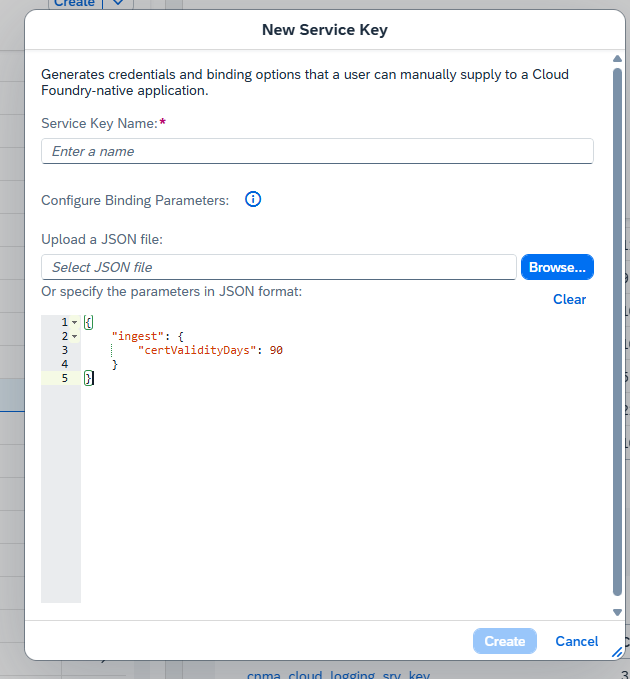
const logger = createLogger({
  ingestEndpoint: 'https://ingest-sf-xxx.cls-16.cloud.logs.services.eu10.hana.ondemand.com',
  username: 'your-username',
  password: 'your-password',
  applicationName: 'my-app',
  subaccountId: 'subaccount-b',
  environment: 'production',
  enableSAPFieldMapping: true, // Enable BTP Cloud Logging field mapping
  removeOriginalFieldsAfterMapping: true // Remove original fields after mapping (default: true)
});
This library supports automatic field mapping to SAP BTP Cloud Logging standard fields:
const logger = createLogger({
  applicationName: 'MyApp',
  subaccountId: 'my-subaccount',
  enableSAPFieldMapping: true
  // removeOriginalFieldsAfterMapping: true (default)
});

// Log entry sent to Cloud Logging:
{
  "msg": "User login successful",           // BTP standard field
  "app_name": "MyApp",                    // BTP standard field
  "organization_name": "my-subaccount",     // BTP standard field
  "level": "INFO",
  "timestamp": "2026-03-05T12:00:00.000Z"
  // Original fields (message, application, subaccount) are removed
}
const logger = createLogger({
  applicationName: 'MyApp',
  subaccountId: 'my-subaccount',
  enableSAPFieldMapping: true,
  removeOriginalFieldsAfterMapping: false // Keep original fields
});

// Log entry sent to Cloud Logging:
{
  "message": "User login successful",        // Original field
  "msg": "User login successful",           // BTP standard field
  "application": "MyApp",                  // Original field
  "app_name": "MyApp",                    // BTP standard field
  "subaccount": "my-subaccount",           // Original field
  "organization_name": "my-subaccount",     // BTP standard field
  "level": "INFO",
  "timestamp": "2026-03-05T12:00:00.000Z"
}
| Original Field | BTP Standard Field | Description |
|---|---|---|
message |
msg |
Log message content |
application |
app_name |
Application name |
subaccount |
organization_name |
Subaccount/organization ID |
enableSAPFieldMapping (boolean, default: true)removeOriginalFieldsAfterMapping (boolean, default: true)false for backward compatibilityconst { createLogger } = require('sap-btp-cloud-logging-client');
const logger = createLogger();
logger.info('Hello from BTP Cloud Logging!');
import { createLogger, middleware as loggingMiddleware } from 'sap-btp-cloud-logging-client';
const logger = createLogger();
logger.info('Hello from BTP Cloud Logging!');
Built-in structured domain logger with console fallback and sensitive data redaction.
No need to copy LogUtils manually — it's now bundled in the package.
Full example: examples/log-utils-built-in-usage.js
JavaScript
const { logUtils, Logger, sanitize } = require('sap-btp-cloud-logging-client');

// Standard
logUtils.info('Application started');
logUtils.error('Order failed', new Error('Timeout'), { orderId: 'ORD-001' });

// API log
logUtils.apiInfo('POST /orders received', { source: 'OrderService', statusCode: 201 });
logUtils.apiError('GET /suppliers failed', new Error('503'), { endpoint: '/suppliers' });

// Event log
logUtils.eventInfo('PurchaseOrder.Created received', { eventType: 'WEBHOOK', entityId: 'PO-001' });

// Base/System log
logUtils.baseInfo('DB migration done', { component: 'MigrationService', action: 'migrate' });
logUtils.baseError('Cache flush failed', new Error('Redis down'), { component: 'CacheService' });
TypeScript
import { logUtils, LogUtils, Logger, sanitize, LogApiOptions } from 'sap-btp-cloud-logging-client';

logUtils.apiInfo('Request received', { source: 'WebhookService', endpoint: '/webhook' });
logUtils.baseError('Startup failed', new Error('Config missing'), { component: 'App' });

// Custom instance (own BTP Cloud Logger init)
const myLogger = new LogUtils();
myLogger.eventInfo('Event processed', { eventName: 'Order.Created', entityId: 'ORD-001' });
const { sanitize } = require('sap-btp-cloud-logging-client');

const safe = sanitize({
    userId: 'u-123',
    password: 'secret',   // → [REDACTED]
    token: 'Bearer xyz',  // → [REDACTED]
    nested: { apikey: 'key' }  // → [REDACTED]
});
const { Logger } = require('sap-btp-cloud-logging-client');

Logger.info('Direct console log');
Logger.error('Startup error', { context: 'init' });
logUtils.apiInfo(...)
    │
    ├─► BTP Cloud Logger (primary)   — sends to Cloud Logging OpenSearch
    └─► Logger/console (fallback)    — always printed locally
         └─► sanitize()              — redacts tokens/passwords before output
[REDACTED])logUtils is a singleton — shared across the app; use new LogUtils() for isolated instancesYou can configure the Express middleware to exclude paths or toggle logging:
const { createLogger, middleware } = require('sap-btp-cloud-logging-client');
const app = require('express')();
const logger = createLogger();

app.use(middleware(logger, {
  logRequests: true,      // Log incoming requests (default: true)
  logResponses: true,     // Log responses (default: true)
  excludePaths: ['/health', '/metrics', '/readiness'] // Skip logging for these paths
}));
const sampleMetadata = {
        source:"S4",
        source_system:"S4H_DEMO",
        payload: {
            user:"leo"
        }
    };
    logger.info(`New Supplier Created`,sampleMetadata);
Result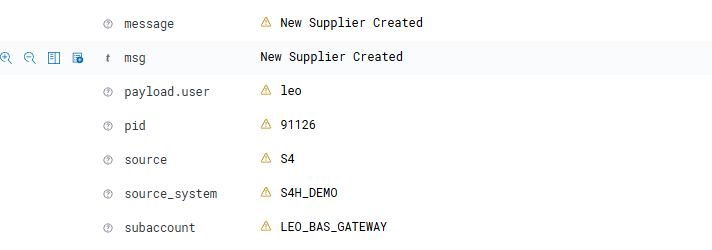
async function batchLogging() {
  const entries = [
    { level: 'INFO', message: 'Batch entry 1', metadata: { batch: 1 } },
    { level: 'INFO', message: 'Batch entry 2', metadata: { batch: 2 } },
    { level: 'WARN', message: 'Batch entry 3', metadata: { batch: 3 } }
  ];

  await logger.logBatch(entries);
}
"dashboards-endpoint": "dashboards-sf-61111e58-2a9a-4790-9baf-efe56ec2c871.cls-16.cloud.logs.services.eu10.hana.ondemand.com",
"dashboards-password": "<sensitive>",
"dashboards-username": "<sensitive>",
Using browser to visit url: dashboards-endpoint and cred (username, password) above
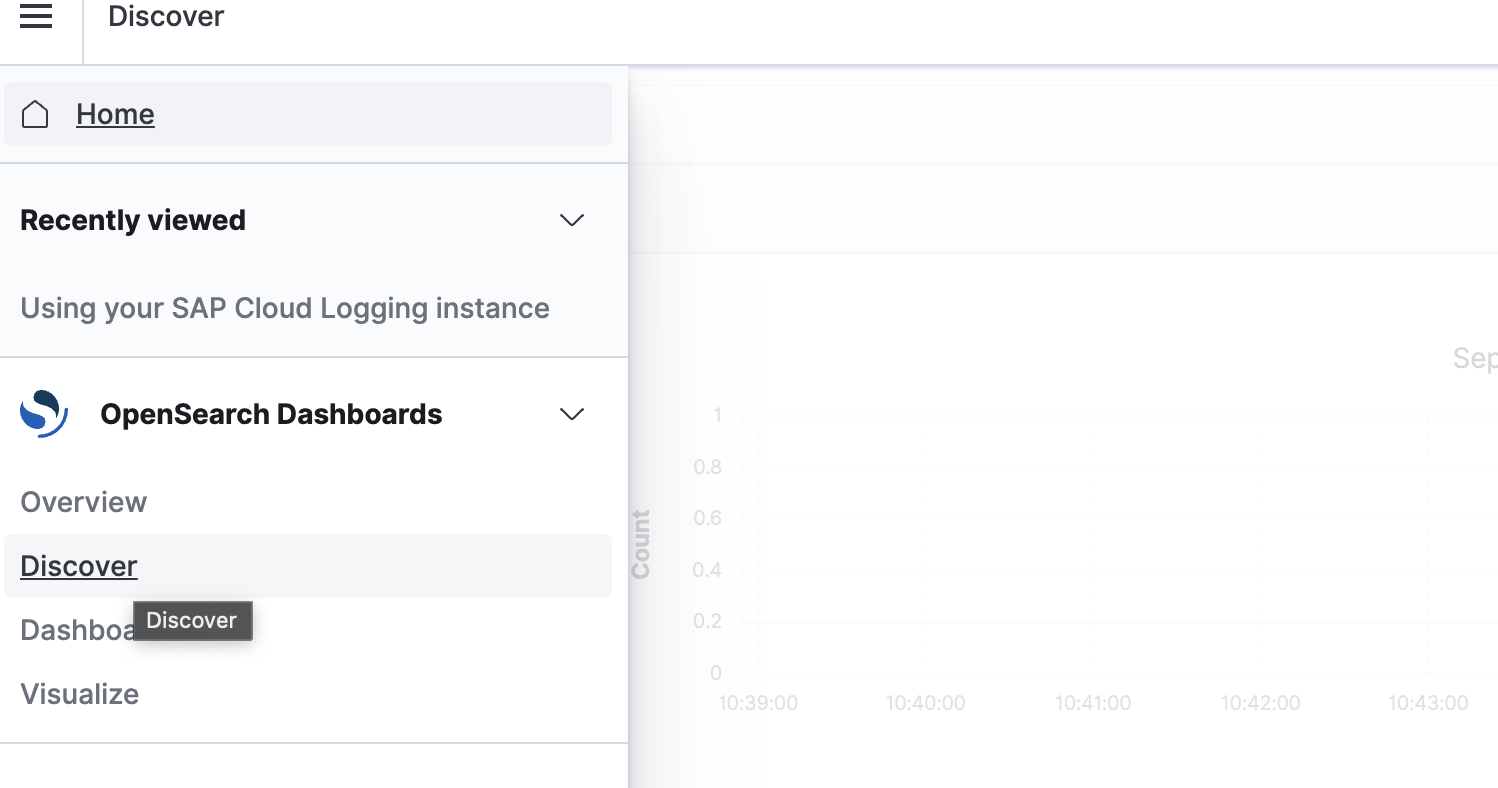
logs-json-*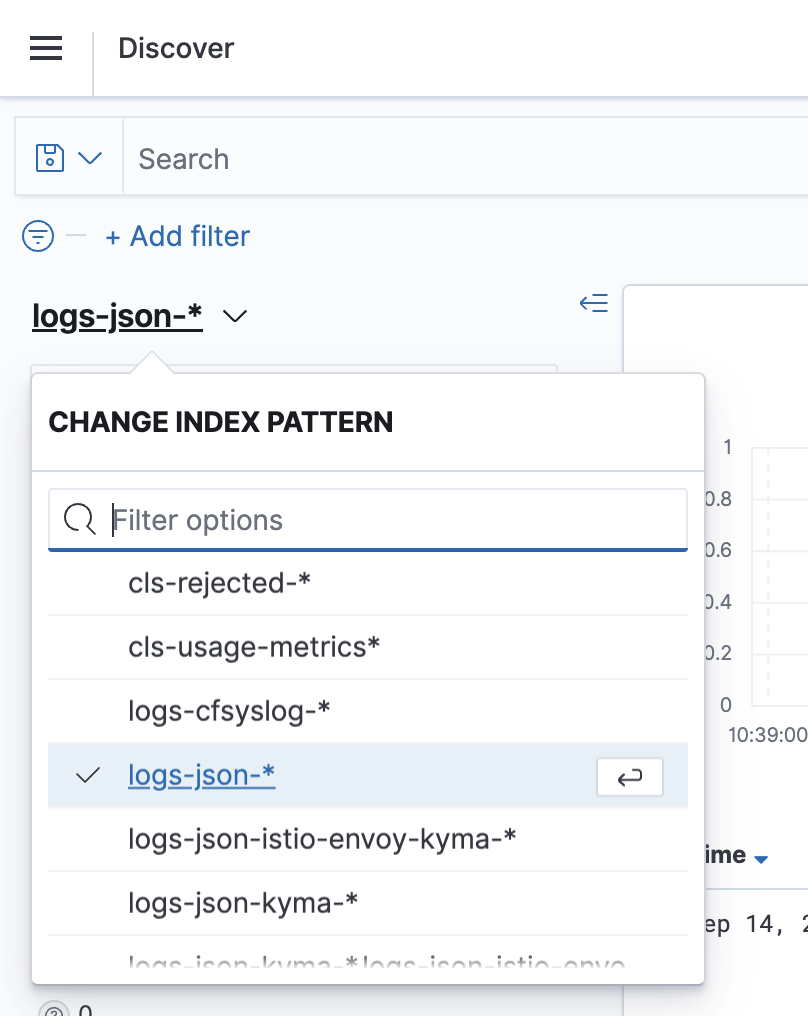
We want to make contributing to this project as easy and transparent as possible. So, just simple do the change then create PR

