
A lightweight, PaddleOCR implementation in Typescript for OCR text detection and recognition in JavaScript environments.
Copy the command below to clone the repository to your machine.





Lightweight, probably the fastest PaddleOCR SDK in TypeScript. Multilingual Support. Runs anywhere JavaScript runs: Node.js, Bun, Deno, web browsers, and browser extensions. Docker & CLI supported. The official SDK is browser-only and significantly slower. Compare it for yourself.
Need it as HTTP-service? dockerized? we've got you covered! Quickly spins up ppu-paddle-ocr REST API here: ppu-paddle-ocr-serve. Need a CLI instead? sure here: ppu-paddle-ocr CLI support.
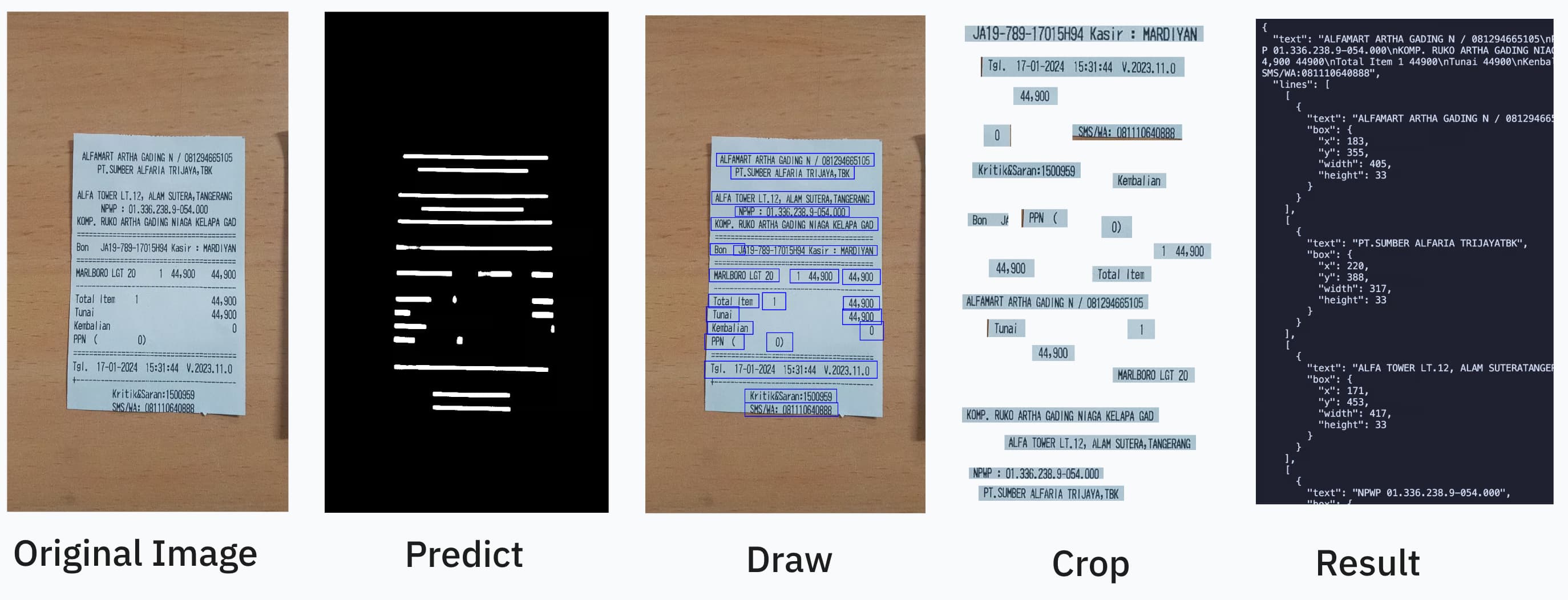
import { PaddleOcrService } from "ppu-paddle-ocr";

const service = new PaddleOcrService();
await service.initialize();

const result = await service.recognize("./receipt.jpg");
console.log(result.text);

await service.destroy();
The same package, the same API, every JavaScript runtime:
| Runtime | How to install | Try it |
|---|---|---|
| Node.js | npm install ppu-paddle-ocr onnxruntime-node |
npm package |
| Bun | bun add ppu-paddle-ocr onnxruntime-node |
npm package |
| Deno | deno add jsr:@snowfluke/ppu-paddle-ocr |
JSR package |
| Web browser | npm install ppu-paddle-ocr onnxruntime-web (import /web subpath) |
Live demo |
| Browser extension | Same as web; bundle ppu-paddle-ocr/web with your extension's bundler. |
Example extension repo |
npm install ppu-paddle-ocr onnxruntime-node onnxruntime-web
Omit onnxruntime-node or onnxruntime-web depending on your target environment (Node/Bun vs browser).
To use the command line without bunx/npx, install globally — this puts a ppu-paddle-ocr command on your PATH:
npm install -g ppu-paddle-ocr      # or: bun add -g ppu-paddle-ocr
ppu-paddle-ocr recognize receipt.jpg
onnxruntime-node is pulled automatically (it's an optional dependency), so nothing else is needed. Notes:
~/.bun/bin is on your PATH (npm's global bin usually already is).@latest to upgrade. (bunx/npx always fetch the latest but can serve a stale cache; a global install pins the version and you own upgrades.)import { PaddleOcrService } from "ppu-paddle-ocr";
const service = new PaddleOcrService({
debugging: {
debug: false,
verbose: true,
},
});
await service.initialize();
const result = await service.recognize("./assets/receipt.jpg");
console.log(result.text);
await service.destroy();
Pass file paths, URLs, or ArrayBuffers for the detection model, recognition model, and dictionary:
const service = new PaddleOcrService({
  model: {
    detection: "./models/custom-det.onnx",
    recognition: "https://example.com/models/custom-rec.onnx",
    charactersDictionary: customDictArrayBuffer,
  },
});

await service.initialize();
const service = new PaddleOcrService();
await service.initialize();

await service.changeDetectionModel("./models/new-det.onnx");
await service.changeRecognitionModel("./models/new-rec.onnx");
await service.changeTextDictionary("./models/new-dict.txt");
Each recognize() call accepts RecognizeOptions for fine-grained control:
// Custom dictionary for one-off recognition
const result = await service.recognize("./assets/receipt.jpg", {
  dictionary: "./models/new-dict.txt",
});

// Disable caching for fresh processing
const fresh = await service.recognize("./assets/receipt.jpg", {
  noCache: true,
});

// Combine options
const result = await service.recognize("./assets/receipt.jpg", {
  noCache: true,
  flatten: true,
  strategy: "per-box",
});
The package ships a bin, so you can OCR without writing any code — bunx/npx resolve it directly (no global install):
# one image → recognized text on stdout
bunx ppu-paddle-ocr recognize receipt.jpg

# a URL, as structured JSON
npx ppu-paddle-ocr recognize https://example.com/invoice.png --json --pretty

# many images (glob), fastest strategy, written to a file
bunx ppu-paddle-ocr batch "scans/*.png" --strategy cross-line --json -o results.json

# print each result as it finishes
bunx ppu-paddle-ocr stream "scans/*.png"

# pre-warm / clear the model cache, inspect the active config
bunx ppu-paddle-ocr download-models
bunx ppu-paddle-ocr clear-cache
bunx ppu-paddle-ocr models --json
Every PaddleOptions / RecognizeOptions field maps to a flag: --strategy, --engine, --flatten, --no-cache, --image-height, --model-detection/-recognition/-dict, detection tuning (--max-side-length, --padding-vertical, --padding-horizontal, --min-area, --mean, --std), --execution-providers, and for batch/stream --concurrency. Output is controlled by --json, --pretty, -o/--output, -q/--quiet, and --verbose.
Recognized text goes to stdout; progress and logs go to stderr, so output pipes cleanly. Exit codes: 0 success, 1 runtime error, 2 usage error. Run bunx ppu-paddle-ocr help for the full reference. The CLI uses the default v5 models unless you override the --model-* flags.
batchRecognize() runs recognize() over many images with bounded concurrency, so memory stays in check: at most concurrency images are decoded and in flight at once. Results are returned index-aligned to the inputs regardless of completion order.
const results = await service.batchRecognize([buf1, buf2, buf3]);
results.forEach((r, i) => console.log(i, r.text));
Concurrency defaults to "auto" — 1 when an accelerator provider (CUDA, WebGPU) is configured (a shared session serializes device work anyway, and parallel runs would stack VRAM), and a small CPU default otherwise to overlap JS preprocessing with native inference. Override it explicitly when you know your hardware:
await service.batchRecognize(images, { concurrency: 8, flatten: true });
Use settle: true to keep going when an image fails — each slot becomes { status, value | reason } instead of the call rejecting:
const results = await service.batchRecognize(images, { settle: true });
for (const r of results) {
  if (r.status === "fulfilled") console.log(r.value.text);
  else console.error("failed:", r.reason);
}
Track progress and cancel with the usual primitives:
const ac = new AbortController();
await service.batchRecognize(images, {
  signal: ac.signal,
  onProgress: (done, total) => console.log(`${done}/${total}`),
});
To consume results as they finish (and avoid buffering the whole batch), stream them — each item carries its input index for reordering:
for await (const item of service.batchRecognizeStream(images)) {
  if (item.status === "fulfilled") console.log(item.index, item.value.text);
}
batchRecognize / batchRecognizeStream also accept any Iterable or AsyncIterable of inputs, so a directory walk or queue never has to be materialized in memory at once. All RecognizeOptions (flatten, strategy, dictionary, noCache) are accepted and applied to every image. See BatchRecognizeOptions for the full surface.
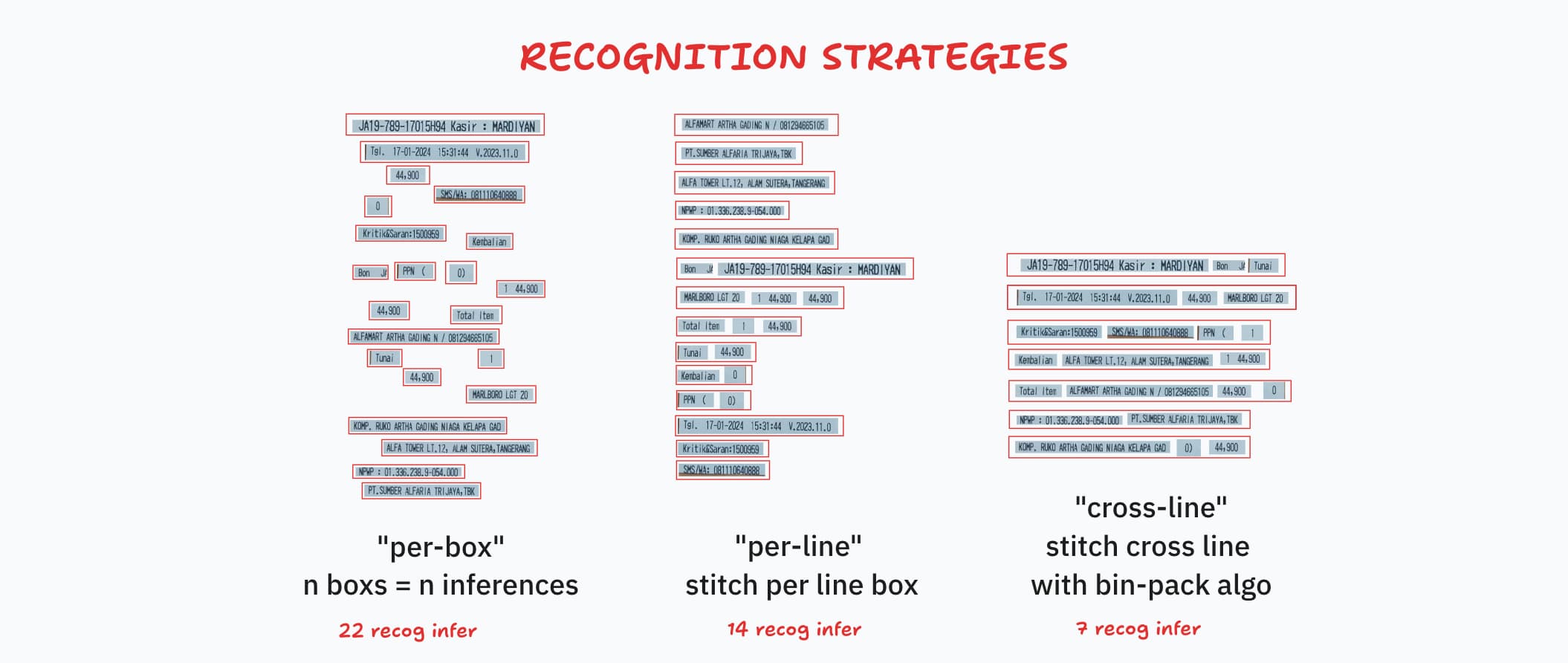
Recognition strategies control how detected text regions are cropped from the canvas and fed into the recognition model. Fewer inference calls means faster throughput.
| Strategy | Description |
|---|---|
per-box |
Each detected box is recognized individually — n boxes, n inferences. |
per-line |
Boxes on the same line are merged into a single crop — fewer inferences. |
cross-line |
Crops are bin-packed across lines into uniform-width batches — fewest calls. |
Default: per-line (best accuracy/speed trade-off).
Strategies are set in RecognitionOptions:
const service = new PaddleOcrService({
  recognition: { strategy: "cross-line" },
});
await service.initialize();
PaddleOCR works best with grayscale or thresholded images. Use ppu-ocv for preprocessing before recognition:
import { ImageProcessor, CanvasProcessor } from "ppu-ocv";
const processor = new ImageProcessor(bodyCanvas);

// For non-OpenCV environments (e.g. browser extensions)
// const processor = new CanvasProcessor(bodyCanvas)

processor.grayscale().blur();
const canvas = processor.toCanvas();
processor.destroy();
Two image processing backends are available for detection preprocessing and recognition resizing:
| Engine | Default | OpenCV Required | Notes |
|---|---|---|---|
"opencv" |
Yes | Yes | Uses OpenCV.js from ppu-ocv. More accurate boxes. |
"canvas-native" |
No | No | Pure canvas from ppu-ocv/canvas. Lighter weight. |
The browser build (ppu-paddle-ocr/web) always uses canvas-native — OpenCV.js is not bundled in the web entry point.
// OpenCV (default, recommended)
const service = new PaddleOcrService();

// Canvas-native (no OpenCV dependency)
const service = new PaddleOcrService({
  processing: { engine: "canvas-native" },
});
Import from ppu-paddle-ocr/web for browser-native capabilities (HTMLCanvasElement, OffscreenCanvas, fetch buffering).
import { PaddleOcrService } from "ppu-paddle-ocr/web";

const service = new PaddleOcrService();
await service.initialize();

const file = document.getElementById("upload").files[0];

const img = new Image();
img.src = URL.createObjectURL(file);
await new Promise((r) => (img.onload = r));

const canvas = document.createElement("canvas");
canvas.width = img.width;
canvas.height = img.height;
canvas.getContext("2d").drawImage(img, 0, 0);

const result = await service.recognize(canvas);
console.log(result.text);
See the live demo for a complete ESM/CDN setup.
On WebGPU-capable browsers (Chrome/Edge on Windows/Linux/macOS, Firefox Nightly), ONNX inference automatically runs on the GPU — typically 2–5× faster with no code changes. The library silently falls back to WASM if WebGPU is unavailable or fails.
Detection runs once during initialize() and is fully transparent.
import { isWebGpuAvailable, getDefaultWebExecutionProviders } from "ppu-paddle-ocr/web";

if (await isWebGpuAvailable()) {
  console.log("WebGPU supported");
}
// Force WASM-only
const service = new PaddleOcrService({
  session: {
    executionProviders: ["wasm"],
    graphOptimizationLevel: "all",
  },
});
The WASM binaries are still required even when WebGPU is the primary provider (used for graph optimization and fallback ops). Set
ort.env.wasm.wasmPathsbeforeinitialize()if you self-host them.
When the WASM backend is used (no WebGPU, or executionProviders: ["wasm"]), ONNX Runtime only runs multithreaded if the page is cross-origin isolated — otherwise numThreads is pinned to 1. Cross-origin isolation requires the Cross-Origin-Opener-Policy: same-origin and Cross-Origin-Embedder-Policy: require-corp response headers.
If you can set those headers server-side, do that — it's the correct fix and needs nothing from this package. WebGPU does not need isolation at all, so this only matters on the WASM fallback path.
For static hosts that can't set headers (e.g. GitHub Pages), the package ships an opt-in coi-serviceworker that injects the headers client-side. Copy it to your served root and load it from your page before anything else:
<script src="/coi-serviceworker.js"></script>
Resolve the shipped copy from the package, e.g. in a build step:
// path on disk: node_modules/ppu-paddle-ocr/coi-serviceworker.js
const swPath = import.meta.resolve("ppu-paddle-ocr/coi-serviceworker.js");
The service worker reloads the page once on first visit to apply the headers and rewrites all fetch responses. Don't use it if you already control your headers or run another service worker that conflicts.
The default PP-OCRv5 mobile models are optimized for English and served in ONNX Runtime's .ort FlatBuffers format (3–5× faster session creation than .onnx):
| Component | File |
|---|---|
| Detection | PP-OCRv5_mobile_det_infer.ort |
| Recognition | en_PP-OCRv5_mobile_rec_infer.ort |
| Dictionary | ppocrv5_en_dict.txt |
Portable .onnx variants are available at ppu-paddle-ocr-models — point model.detection / model.recognition at the .onnx URLs.
Models are cached under ~/.cache/ppu-paddle-ocr:
| OS | Path |
|---|---|
| macOS | ~/.cache/ppu-paddle-ocr |
| Linux | ~/.cache/ppu-paddle-ocr |
| Windows | C:\Users\<username>\.cache\ppu-paddle-ocr |
// Warm the cache (e.g. in CI or Docker builds)
PaddleOcrService.downloadModels();

// Clear the cache
service.clearModelCache();
In the browser, model files are fetched via
fetch()on every page load and rely on the browser's HTTP cache. For persistent offline caching, use a Service Worker or store theArrayBufferin IndexedDB.
PP-OCRv5 supports 40+ languages across different script systems. Pre-converted ONNX models are available at ppu-paddle-ocr-models:
const MODEL_BASE =
  "https://media.githubusercontent.com/media/PT-Perkasa-Pilar-Utama/ppu-paddle-ocr-models/refs/heads/main";
const DICT_BASE =
  "https://raw.githubusercontent.com/PT-Perkasa-Pilar-Utama/ppu-paddle-ocr-models/refs/heads/main";

// Thai
const service = new PaddleOcrService({
  model: {
    detection: `${MODEL_BASE}/detection/PP-OCRv5_mobile_det_infer.onnx`,
    recognition: `${MODEL_BASE}/recognition/multi/thai/v5/th_PP-OCRv5_mobile_rec_infer.onnx`,
    charactersDictionary: `${DICT_BASE}/recognition/multi/thai/v5/ppocrv5_th_dict.txt`,
  },
});
PP-OCRv5 is available in mobile and server variants:
const service = new PaddleOcrService({
  model: {
    detection: `${MODEL_BASE}/detection/PP-OCRv5_server_det_infer.onnx`,
    recognition: `${MODEL_BASE}/recognition/multi/en/v5/en_PP-OCRv5_server_rec_infer.onnx`,
    charactersDictionary: `${DICT_BASE}/recognition/multi/en/v5/ppocrv5_en_dict.txt`,
  },
});
The recognition model's transformer MatMul operations can be dynamically quantized to INT8 with no accuracy loss (measured 99.22% → 99.22%) and a 20–50% speedup on x86-64 CPUs with VNNI and WebAssembly.
On Apple Silicon (M-series), INT8 is not faster — the FP32 NEON/Accelerate kernels outperform the INT8 MLAS path. Stick with FP32 on macOS ARM64.
Run the quantization helper:
pip install onnxruntime onnx sympy
python examples/quantize-onnx.py /path/to/en_PP-OCRv5_mobile_rec_infer.onnx
# -> produces en_PP-OCRv5_mobile_rec_infer_int8.onnx
Use the quantized model via model.recognition:
const service = new PaddleOcrService({
  model: {
    recognition: "https://example.com/en_PP-OCRv5_mobile_rec_infer_int8.onnx",
  },
});
INT8 .ort variants are also available in the ppu-paddle-ocr-models repo.
See the ONNX conversion guide.
PaddleOptionsimport type { PaddleOptions } from "ppu-paddle-ocr";
export type PaddleOptions = {
model?: ModelPathOptions;
detection?: DetectionOptions;
recognition?: RecognitionOptions;
debugging?: DebuggingOptions;
session?: SessionOptions;
processing?: ProcessingOptions;
};
RecognizeOptionsPer-call options for recognize().
| Property | Type | Default | Description |
|---|---|---|---|
flatten |
boolean |
false |
Return flat results instead of grouped by lines. |
strategy |
"per-box" | "per-line" | "cross-line" |
service default | Override strategy for this call. |
dictionary |
string | ArrayBuffer |
null |
Custom character dictionary (disables caching). |
noCache |
boolean |
false |
Bypass the result cache. |
BatchRecognizeOptionsExtends RecognizeOptions (applied to every image) for batchRecognize() / batchRecognizeStream().
| Property | Type | Default | Description |
|---|---|---|---|
concurrency |
number | "auto" |
"auto" |
Max images in flight. "auto" = 1 on an accelerator provider, small default on CPU. |
settle |
boolean |
false |
When true, a failed image yields { status: "rejected", reason } instead of throwing. |
signal |
AbortSignal |
null |
Cancels the batch; pending images are not scheduled and the call rejects. |
onProgress |
(done, total?) => void |
null |
Called after each image settles, with the running count and total (if known). |
ModelPathOptions| Property | Type | Default / Required | Description |
|---|---|---|---|
detection |
string | ArrayBuffer |
Optional (uses default model) | Path, URL, or buffer for the detection model. |
recognition |
string | ArrayBuffer |
Optional (uses default model) | Path, URL, or buffer for the recognition model. |
charactersDictionary |
string | ArrayBuffer |
Optional (uses default English dictionary) | Path, URL, or buffer of the dictionary file. |
Leave a trailing newline in your dictionary file.
DetectionOptionsControls preprocessing and filtering during text detection.
| Property | Type | Default | Description |
|---|---|---|---|
mean |
[number, number, number] |
[0.485, 0.456, 0.406] |
Per-channel mean for input normalization [R, G, B]. |
stdDeviation |
[number, number, number] |
[0.229, 0.224, 0.225] |
Per-channel std dev for input normalization. |
maxSideLength |
number |
640 |
Longest side limit (px); larger images are scaled down. |
paddingVertical |
number |
0.4 |
Fractional vertical padding per detected box. |
paddingHorizontal |
number |
0.6 |
Fractional horizontal padding per detected box. |
minimumAreaThreshold |
number |
50 |
Minimum box area (px²); smaller boxes are discarded. |
RecognitionOptionsControls recognition preprocessing and strategy.
| Property | Type | Default | Description |
|---|---|---|---|
imageHeight |
number |
48 |
Fixed height for resized text line images (px). |
strategy |
"per-box" | "per-line" | "cross-line" |
"per-line" |
Recognition strategy (see above). |
crossLineWidthFactor |
number |
1.0 |
Batch width multiplier for cross-line strategy. |
charactersDictionary |
string[] |
[] |
Loaded character dictionary for result decoding. |
DebuggingOptions| Property | Type | Default | Description |
|---|---|---|---|
verbose |
boolean |
false |
Detailed console logs of each processing step. |
debug |
boolean |
false |
Write intermediate image frames to disk. |
debugFolder |
string |
"out" |
Output directory for debug images. |
SessionOptionsAny valid ONNX Runtime InferenceSession.SessionOptions property is accepted. ppu-paddle-ocr sets these defaults:
| Property | Type | Default | Description |
|---|---|---|---|
executionProviders |
string[] | ExecutionProviderConfig[] |
['cpu'] |
Execution providers for inference. Accepts strings or config objects. |
graphOptimizationLevel |
'disabled' | 'basic' | 'extended' | 'layout' | 'all' |
'all' |
ONNX graph optimization level. |
enableCpuMemArena |
boolean |
true |
Enable CPU memory arena for better memory management. |
enableMemPattern |
boolean |
true |
Enable memory pattern optimization. |
executionMode |
'sequential' | 'parallel' |
'sequential' |
Execution mode for the session. |
interOpNumThreads |
number |
0 |
Inter-op threads (0 = ONNX decides). |
intraOpNumThreads |
number |
0 |
Intra-op threads (0 = ONNX decides). |
const service = new PaddleOcrService({
  session: {
    executionProviders: ["cpu"],
    graphOptimizationLevel: "all",
    enableCpuMemArena: true,
    enableMemPattern: true,
    executionMode: "sequential",
  },
});
ProcessingOptions| Property | Type | Default | Description |
|---|---|---|---|
engine |
"opencv" | "canvas-native" |
"opencv" |
Image processing backend (see above). |
Benches use a small zero-dependency harness (bench/harness.ts): in-process timing, round-robin scheduling across rounds so thermal/GC drift hits every task equally, reporting the median plus min/max/stddev. Run bun task bench. Representative results on Apple M1 / Bun 1.3.14 (20 rounds, opencv + canvas-native):
task                                   median      ±stddev        min        max
--------------------------------------------------------------------------------
[per-box][opencv][noCache]             233.0 ms      14.6 ms   211.2 ms   254.5 ms
[per-line][opencv][noCache]            224.7 ms      17.6 ms   194.3 ms   256.0 ms
[cross-line][opencv][noCache]          213.9 ms      18.7 ms   194.7 ms   266.3 ms
[per-box][canvas-native][noCache]      242.3 ms      22.0 ms   213.3 ms   301.1 ms
[per-line][canvas-native][noCache]     224.3 ms      13.9 ms   201.9 ms   245.4 ms
[cross-line][canvas-native][noCache]   223.3 ms      14.4 ms   198.3 ms   248.6 ms

=== Accuracy on receipt.jpg (ground truth: 383 chars) ===
  [opencv]       per-box=97.91%  per-line=99.22%  cross-line=96.34%
  [canvas-native] per-box=97.65% per-line=98.43%  cross-line=97.65%
Absolute timings are thermal-sensitive on fanless hardware (Apple Silicon): sustained benching warms the chip and drags the median up, while the min column tracks the unthrottled per-call cost (~195 ms here). Treat these as relative, same-run comparisons, not cross-machine absolutes.
recognize()bench/batch.bench.ts compares the ways to OCR many images, tracking peak RSS alongside time. Default models (v5), median over 7 rounds of 16 images each, Apple M1 / Bun 1.3.14, opencv, noCache:
task                          median      ±stddev        min        max   peak RSS
----------------------------------------------------------------------------------
sequential for-loop          3802.5 ms     300.6 ms  3169.4 ms  3979.7 ms    1059 MB
Promise.all(map(recognize))  3543.5 ms     254.0 ms  3030.0 ms  3768.0 ms    1428 MB
batchRecognize (auto)        3676.1 ms     200.9 ms  3217.1 ms  3761.3 ms    1096 MB
batchRecognize (c=4)         3653.8 ms     239.1 ms  3170.1 ms  3804.1 ms    1027 MB
batchRecognize (c=8)         3605.7 ms     187.6 ms  3202.1 ms  3786.6 ms    1096 MB
On CPU, throughput is bound by ONNX Runtime's native thread pool (which already saturates all cores per inference), so every parallel approach lands within ~4% on time — JS-level concurrency cannot add cores that are already busy. The real difference is memory: unbounded Promise.all peaks at ~1430 MB and grows with batch size, while batchRecognize stays bounded at ~1030–1100 MB regardless of N. So batchRecognize matches the fastest approach at lower, bounded peak memory — and the throughput win from concurrency shows up on GPU (overlapping host↔device) or I/O-bound inputs. Tune BATCH_N / ROUNDS via env.
See CONTRIBUTING.md for setup instructions, code-quality requirements, and the pull request process.
MIT — see LICENSE.
Open an issue or join our Slack community.
Recommended development environment is Linux-based. Library template: https://github.com/aquapi/lib-template
| Script | Command | Description |
|---|---|---|
bun task build |
bun run scripts/build.ts |
Emit .js and .d.ts to lib/. |
bun task publish |
bun run scripts/publish.ts |
Stage package.json + README.md to lib/ and publish. |
bun task bench |
bun run scripts/bench.ts |
Run *.bench.ts files. |
bun task bench --node index |
Run benchmark with Node.js for a specific file. |
To run a specific benchmark file:
bun task bench index     # Run bench/index.bench.ts
bun task bench --node    # Run all benchmarks with Node.js

