
Copy the command below to clone the repository to your machine.
Flutter testing skills for AI coding agents.
Show case E2E and SRS report:
Run the package CLI:
npx shipflutter-skills list
The npm package ships the skill files and a small listing command. Use the open skills CLI below to install skills into AI agents.
Publish with an npm token:
NODE_AUTH_TOKEN='<npm-token>' npm run publish:npm
The token must have publish permission. If your npm account uses 2FA, use a granular token with bypass 2FA enabled or publish manually with --otp.
These skills follow the Agent Skills SKILL.md format and work with Claude Code natively. There are three ways to make Claude Code use them.
The repo ships a plugin marketplace (.claude-plugin/marketplace.json). In Claude Code:
/plugin marketplace add shipflutter/skills
/plugin install shipflutter-skills@shipflutter
This loads all skills (add-feat, add-srs, appdist, flutter-integration-test, flutter-driver-screenshot-test, flutter-unit-test-coverage, privacy-safe-device-referral-attributes, marketing-app-banner, universal-download-link) into every Claude Code session. Each skill bundles its own scripts/, assets/, and references/, resolved relative to the skill — no extra setup needed.
skills CLI)See Install skills below to copy individual skills (or all) into .claude/skills/ for Claude Code, Cursor, and other agents.
To let Claude Code load the skills while developing in this repo, symlink them into the project skill path (.claude/skills, which is gitignored):
npm run link:claude
# or: bash scripts/link-claude-skills.sh
This creates .claude/skills -> ../skills so Claude Code discovers every skill from the source of truth without copying.
List available skills:
npx skills add shipflutter/skills --list
Install all skills for Claude Code in the current project:
npx skills add shipflutter/skills --skill '*' -a claude-code --copy
Install all skills globally for Claude Code:
npx skills add shipflutter/skills --skill '*' -a claude-code -g --copy
Install one skill:
npx skills add shipflutter/skills --skill add-feat -a claude-code --copy
npx skills add shipflutter/skills --skill add-srs -a claude-code --copy
npx skills add shipflutter/skills --skill flutter-integration-test -a claude-code --copy
npx skills add shipflutter/skills --skill flutter-driver-screenshot-test -a claude-code --copy
npx skills add shipflutter/skills --skill appdist -a claude-code --copy
npx skills add shipflutter/skills --skill flutter-unit-test-coverage -a claude-code --copy
npx skills add shipflutter/skills --skill privacy-safe-device-referral-attributes -a claude-code --copy
| Skill | Description | Example prompt |
|---|---|---|
add-feat |
Creates feature user-story and technical-design docs, including gen-tdd source scanning. |
Run add-feat gen-tdd auth EP01 and create the feature docs. |
add-srs |
Generates or updates SRS packages from user-story and technical-design docs. | Generate the SRS from the current user-story and technical-design docs. |
appdist |
Automated CI/CD deploy pipeline — iOS TestFlight, Android Firebase App Distribution, and Google Play Store internal testing with Telegram notifications. | Use $appdist to set up deploy pipeline for iOS and Android. |
flutter-integration-test |
Adds Flutter integration_test coverage that runs on emulator/simulator without saving screenshot images. |
Add Flutter integration tests for the main app flow without saving screenshots. |
flutter-driver-screenshot-test |
Adds Flutter driver screenshot tests that save PNG files through the host driver process. | Add e2e screenshot tests for the main screens and save PNG files to screenshots/. |
flutter-unit-test-coverage |
Adds Flutter unit/widget coverage reporting with flutter test --coverage and optional HTML reports. |
Add a run_test.sh script that generates Flutter unit test coverage and an HTML report. |
privacy-safe-device-referral-attributes |
Adds privacy-safe Flutter Android, iOS, Web, and static Web device/referral attribute demos. | Add a transparent device referral attributes screen without third-party IP lookup or invasive fingerprinting. |
marketing-app-banner |
Adds a native-style "Get the app" smart banner pinned to the top of a website or web app, auto-detecting iOS vs Android. | Add a marketing app-install banner to my landing site that links to the right store. |
universal-download-link |
One shared link + QR that auto-detects the OS and opens the right store (App Store / Google Play); desktop gets a chooser. | Create a universal /get/ download link and a QR that opens the right app store. |
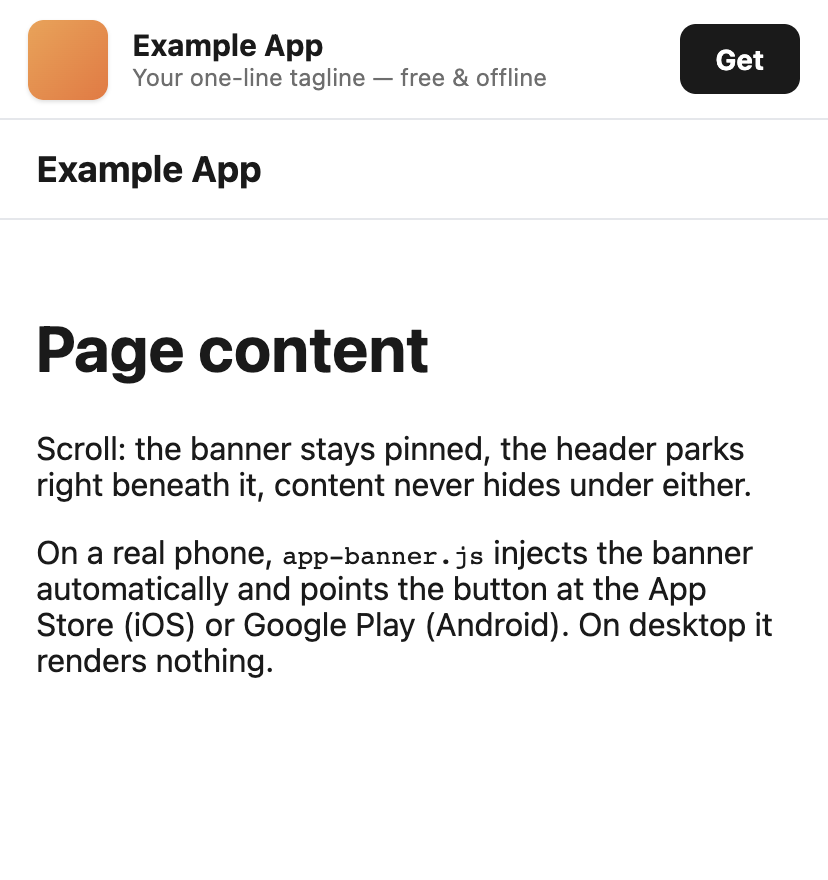
marketing-app-banner — a native-style "Get the app" bar pinned above the page header, hidden on desktop:
universal-download-link — one link + QR that auto-detects the OS (interactive demo: platform simulator, live detection, shared QR):
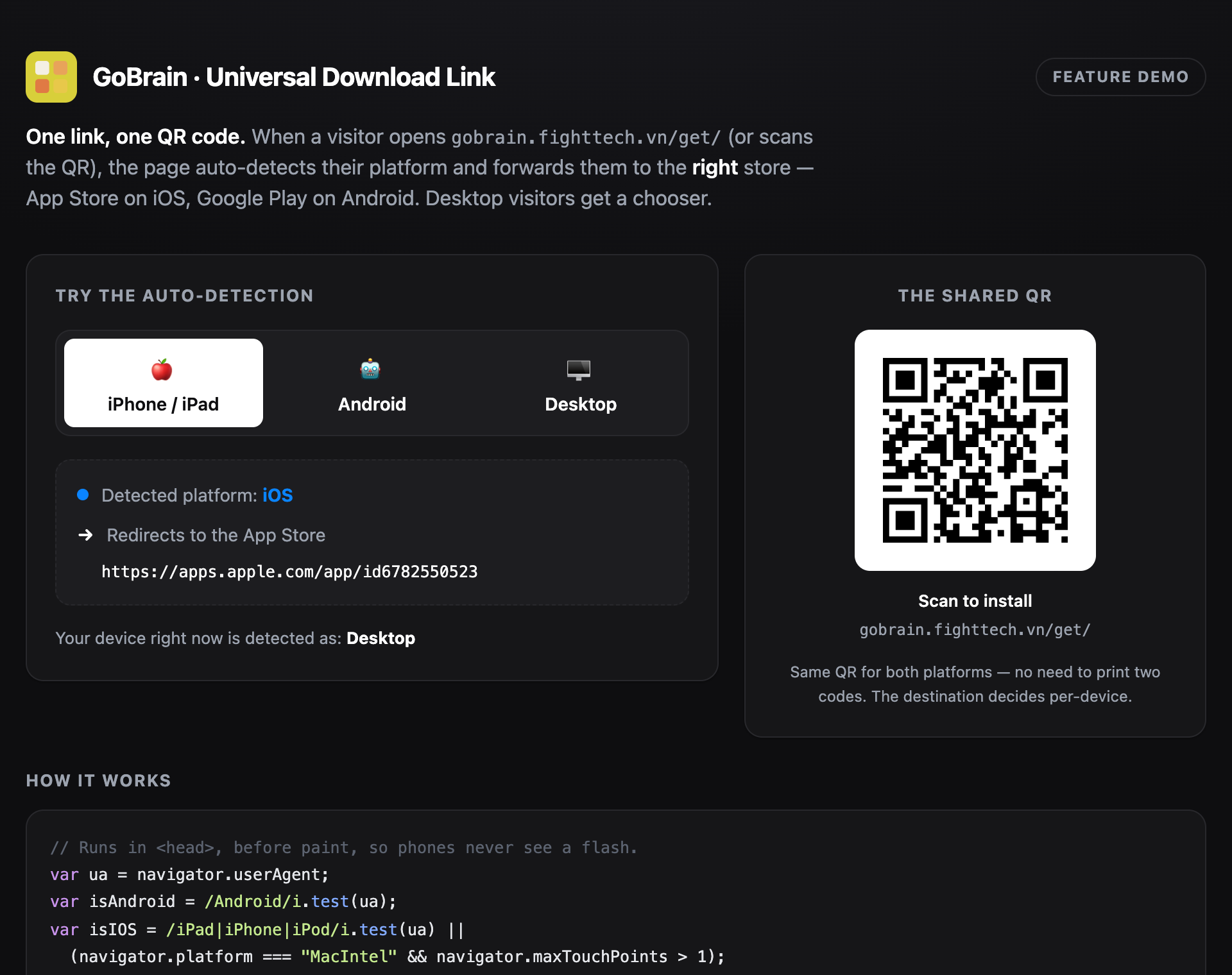
Both previews are the skills' own
examples/demo.html— open that file (no build) to try them live.
.claude-plugin/            # Claude Code plugin marketplace manifest
├── marketplace.json
└── plugin.json
skills/
├── add-feat/
│   ├── SKILL.md
│   ├── assets/templates/
│   ├── references/
│   └── scripts/add_feat.sh
├── add-srs/
│   └── SKILL.md
├── appdist/
│   ├── SKILL.md
│   ├── agents/openai.yaml
│   ├── scripts/
│   │   ├── deploy.sh
│   │   ├── prod.sh
│   │   ├── prepare.sh
│   │   ├── telegram.sh
│   │   └── upload-playstore.py
│   ├── assets/
│   │   ├── .env.example
│   │   ├── app_dist_template/
│   │   │   └── README.md
│   │   └── github_workflows/
│   │       └── deploy-uat.yml
│   └── references/
│       ├── EP01.US001.md
│       └── ep01-shipflutter-deploy.md
├── flutter-integration-test/
│   ├── SKILL.md
│   └── scripts/
│       └── integration_test.sh
├── flutter-driver-screenshot-test/
│   ├── SKILL.md
│   └── scripts/
│       └── e2e.sh
├── flutter-unit-test-coverage/
│   ├── SKILL.md
│   └── scripts/
│       └── run_test.sh
└── privacy-safe-device-referral-attributes/
    ├── SKILL.md
    ├── examples/
    │   └── prompts.md
    └── reference/
        └── attribute-contract.md
Use add-feat gen-tdd to derive user-story and technical-design docs from a Flutter feature source tree:
scripts/add_feat.sh gen-tdd auth EP01
The command creates:
resources/user-story/ep01-auth.mdresources/technial-design/ep01-auth.mdUse add-srs after that to compile the generated docs into resources/srs.md and render srs-index.html through resources/srs.sh.
The generated srs-index.html ships a left-sidebar switcher with three views, all built from the same resources/ sources:
## Events. Screens auto-order into a path so a hub screen (e.g. sign-in) sits between the screens it links to.Status: line; clicking a card opens its full description and acceptance-criteria task checklist. A List layout adds status filter tags to slice the stories.Two conventions wire these up (emitted by add-feat gen-tdd):
## Events written as EventName -> description (or →) referencing the target screen draw the Flow arrows.Status: line under each ## EPXX.US### story places it on the Board.Live demo: https://shipflutter.github.io/vibe/srs.html
Copy the prompt below into Claude Code (use the Copy button on the code block) to make the agent analyze a codebase and produce the complete document set — feature brief, user stories, technical design, screen layouts, and a rendered SRS with the Docs · Flow · Board views — using the latest templates. It is self-contained: it installs the skills first, so one copy is all you need.
Use the add-feat and add-srs skills from the shipflutter/skills repo
(https://github.com/shipflutter/skills) to analyze this project and create the
full product documentation using the latest templates.

0. INSTALL THE SKILLS FIRST (skip if already available). Install the plugin in Claude Code:
   /plugin marketplace add shipflutter/skills
   /plugin install shipflutter-skills@shipflutter
   Or copy them into the project:
   npx skills add shipflutter/skills --skill add-feat -a claude-code --copy
   npx skills add shipflutter/skills --skill add-srs -a claude-code --copy

1. ANALYZE FIRST. Map the product end to end (frontend, backend/API, data model, build/deploy).
   Group the functionality into epics EP01, EP02, … each with a kebab-case slug (e.g. ep01-auth).
   List the epics before writing files.

2. FOR EVERY EPIC create (under resources/, following skills/add-feat/assets/templates/):
   - resources/user-story/epXX-<slug>.md — stories as "## EPXX.US###: Title", each with:
     • a "Status:" line (Backlog | To Do | Sprint | In Progress | In Review | Done) — Board column;
     • an "As a … I want … so that …" line (card description);
     • an "Acceptance criteria:" bullet list (= task checklist; nested bullets = sub-tasks).
   - resources/technial-design/epXX-<slug>.md — Technologies, Entry Points (real file paths),
     Flow (numbered), one Mermaid diagram, an Entities table, Tests.
   - resources/screens/epXX-<slug>-screen.md — first heading = screen name; one ASCII wireframe in a
     fenced code block (box-drawing ┌─┐│└┘├┤┬┴); "## Components", "## States", "## Events".
     Write events as "EventName -> description" (or →) referencing the target screen by FILE ID
     (e.g. "… -> navigate to ep02-…-screen") or by TITLE KEYWORD so the Flow view draws arrows;
     add a return event on the target screen for two-way connectors.
   - one resources/feature-brief.md — product brief + epic catalog table.

3. COMPILE THE SRS. Write resources/srs.md: purpose, scope, requirements summary, user-story index,
   use cases, a "## Screens / UI Surfaces" section (leave it EMPTY for the script to inject),
   data/entity model with a Mermaid ER diagram, external interfaces/API, NFRs, risks, and a
   traceability matrix (FR → epic → stories → design → screen → verification).

4. RENDER. Ensure resources/srs.sh exists (copy the latest from
   examples/flutter-poc-auth/resources/srs.sh and rebrand the sidebar title), run ./resources/srs.sh
   to generate srs-index.html at the project root, and verify all three views:
   📄 Docs (TOC + injected screens) · 🔀 Flow (one card per screen, arrows from ## Events) ·
   🗂️ Board (one card per story, placed by Status:).

Keep box-drawing characters intact inside fenced code blocks, keep everything local (no external
renderers), and keep resources/srs.md as the single editable source of truth.

5. DELIVERABLES CHECKLIST — the work is done only when every item is true; report it back ticked:
   [ ] resources/feature-brief.md — brief + epic catalog table.
   [ ] resources/user-story/epXX-<slug>.md per epic — "## EPXX.US###" stories with a Status: line,
       an "As a …" line, and an "Acceptance criteria:" list (nested bullets = sub-tasks).
   [ ] resources/technial-design/epXX-<slug>.md per epic — Technologies, Entry Points, Flow,
       a Mermaid diagram, an Entities table, Tests.
   [ ] resources/screens/epXX-<slug>-screen.md per screen — ASCII wireframe + ## Components/States/Events;
       events "EventName -> …" referencing the target screen so the Flow view draws arrows.
   [ ] resources/srs.md — all sections + "## Screens / UI Surfaces" placeholder + Mermaid ER +
       a traceability matrix.
   [ ] resources/srs.sh (latest) present, and srs-index.html generated via ./resources/srs.sh.
   [ ] Verify in srs-index.html: Docs injects the screens · Flow shows arrows from ## Events ·
       Board places one card per story by Status: (click a card → description + tasks) ·
       box-drawing characters preserved · no leftover injection markers.

Tip: to derive starter docs from an existing Flutter feature tree, run
scripts/add_feat.sh gen-tdd <slug> EPXX first, then refine the generated files.
The agent's output is complete when every box is ticked:
Per-epic docs (latest templates)
resources/feature-brief.md — product brief + epic catalog table.resources/user-story/epXX-<slug>.md for each epic.## EPXX.US###: Title.Status: line (Board column) — omit only to default to Done.As a … line (card description) + Acceptance criteria: bullets (task checklist); nested bullets = sub-tasks.resources/technial-design/epXX-<slug>.md for each epic.resources/screens/epXX-<slug>-screen.md for each UI-bearing epic.## Components, ## States, ## Events.## Events use EventName -> description referencing the target screen by file id or title keyword (drives Flow arrows); return event added for two-way arrows.SRS package
resources/srs.md — purpose, scope, requirements summary, user-story index, use cases, ## Screens / UI Surfaces placeholder section, data/entity model (Mermaid ER), API/interfaces, NFRs, risks, traceability matrix.resources/srs.sh present (latest version) and rebranded sidebar title.srs-index.html regenerated at project root by running ./resources/srs.sh.Verification (open srs-index.html)
resources/screens/*.md is injected under Screens / UI Surfaces.## Events reference other screens.Status:; Board/List toggle + status filters work; clicking a card shows description + acceptance-criteria tasks.The repository includes examples/flutter-poc-fingerprint as a runnable reference for privacy-safe device/referral attributes.
flowchart TD
  A[User opens device page or POC] --> B{Runtime}
  B -->|Android| C[Load safe Android attributes]
  B -->|iOS| D[Load safe iOS attributes]
  B -->|Flutter Web| E[Load browser attributes]
  B -->|Static Web| F[Run device.html JavaScript]
  C --> G[Normalize allowed device fields]
  D --> G
  E --> G
  F --> G
  A --> H[Parse allowlisted referral params]
  H --> I[Generate local SHA-256 hash]
  G --> I
  I --> J[Render transparent JSON report]
Implemented attributes include platform, OS/browser version, model/manufacturer where available, locale, timezone, screen size, device pixel ratio, referrer, and allowlisted referral params. Public IP is documented as unavailable without a same-origin backend endpoint.
The repository includes examples/flutter-poc-auth as a runnable reference for the add-feat and add-srs workflows.
It demonstrates:
resources/.cd examples/flutter-poc-auth
../../scripts/add_feat.sh gen-tdd auth EP01
./resources/srs.sh
flutter pub get
flutter test
shipflutter/skills because the GitHub repository is https://github.com/shipflutter/skills.shipflutter-skills.SKILL.md format with name and description frontmatter..claude/skills/ (project) and ~/.claude/skills/ (global), or from an installed plugin. The repo's .claude-plugin/ manifest exposes all skills as the shipflutter-skills plugin.
