
Copy the command below to clone the repository to your machine.
The marketing intern that never sleeps.


Open-source framework that generates and publishes marketing content across 7 platforms from a single command.
Marketing was eating 2+ hours/day as a solo founder. So I built an intern that never sleeps.
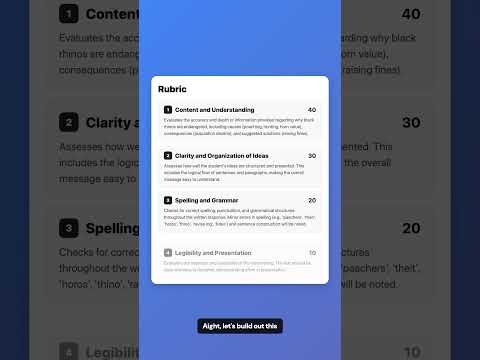
Click to watch an AI-generated Instagram Reel
| Platform | Content | Generate | Publish | In-Context Learning |
|---|---|---|---|---|
| Reels, Carousels | ✅ | ✅ | ✅ | |
| X / Twitter | Replies, Threads | ✅ | ✅ | ✅ |
| Comments, Posts | ✅ | ✅ | - | |
| Posts, Images, Videos, Docs | ✅ | 🚧 WIP | - | |
| YouTube | Shorts | ✅ | ✅ | - |
| TikTok | Videos | ✅ | ✅ | - |
| Bulk outreach | ✅ | ✅ | - |
In-Context LearningLearns from your top-performing posts. The more you post, the better it matches your voice. |
Brand TemplatesFigma MCP + YAML templates. Your fonts, colors, layout. AI fills the content. |
Engagement AutomationFinds relevant conversations, writes contextual replies, posts with human-like timing. |
Email BatchingCSV in, 100 personalized emails out. Picks up where it left off. |
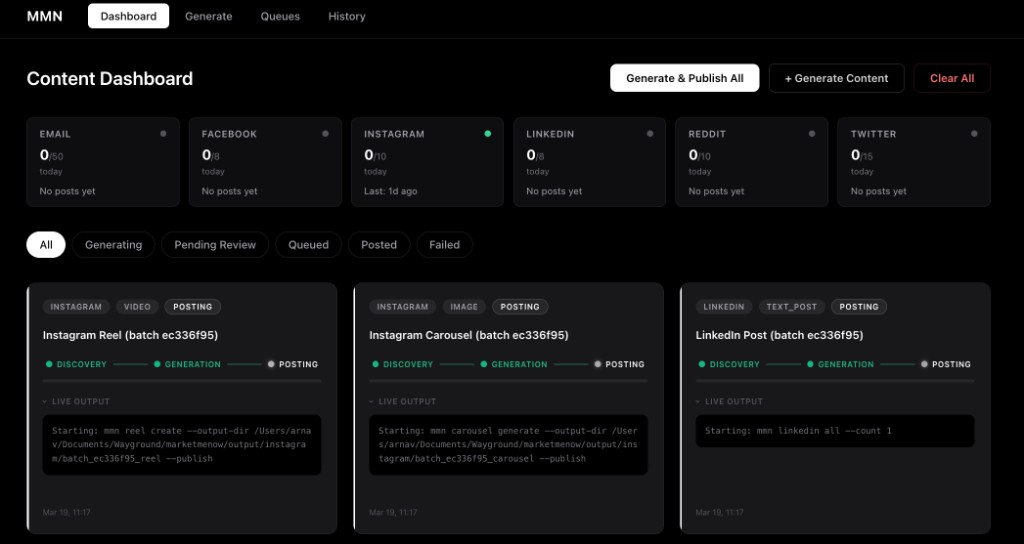
Real-Time DashboardLive progress, streaming logs, approve/reject per item. One click to publish all. |
Modular AdaptersAdd a platform with zero changes to core. Ports-and-adapters architecture. |
Auto-HealOne command runs lint, format, and tests - then hands failures to the Cursor agent to fix automatically. |
Content CapsulesEvery generated reel, carousel, and thread is packaged into a self-contained capsule. Cross-post to any platform with one command — no re-generation needed. |
Cross-Platform RepurposingRepurpose any capsule for a different platform and format. Video caption becomes a Twitter thread. Thread becomes a LinkedIn post. LLM-powered format-aware transformations. |
git clone https://github.com/thearnavrustagi/marketmenow.git && cd marketmenow && bash setup.sh
Edit .env with your API keys, then:
uv run mmn-web # Dashboard at http://localhost:8000
Manual setupRequirements: Python 3.12+, uv (setup.sh installs it). Docker recommended for PostgreSQL. Node.js 18+ only if you want Instagram Reels.
git clone https://github.com/thearnavrustagi/marketmenow.git
cd marketmenow

uv sync
docker compose up -d
cp .env.example .env

uv run pre-commit install --hook-type pre-push   # tests + lint before every push
uv run playwright install chromium
cd src/adapters/instagram/reels/remotion && npm install && cd -

uv run mmn-web
You only need credentials for the platforms you use:
| Platform | What you need |
|---|---|
INSTAGRAM_ACCESS_TOKEN, INSTAGRAM_BUSINESS_ACCOUNT_ID |
|
FACEBOOK_C_USER, FACEBOOK_XS (optionally FACEBOOK_PAGE_IDS) |
|
| Twitter/X | TWITTER_AUTH_TOKEN, TWITTER_CT0 (or mmn twitter login) |
REDDIT_SESSION cookie, REDDIT_USERNAME |
|
LINKEDIN_ACCESS_TOKEN (or LINKEDIN_LI_AT cookie) |
|
| YouTube | Google OAuth 2.0 (mmn auth youtube) |
| TikTok | TIKTOK_SESSION_ID cookie (or OAuth 2.0 via mmn auth tiktok) |
SMTP_HOST, SMTP_PORT, SMTP_USERNAME, SMTP_PASSWORD, SMTP_FROM |
|
| AI (all) | AI Studio: GEMINI_API_KEY (or GOOGLE_API_KEY) or Vertex: GOOGLE_APPLICATION_CREDENTIALS, VERTEX_AI_PROJECT |
# Instagram
mmn reel create --publish
mmn carousel generate --publish

# Facebook
mmn facebook login --cookies
mmn facebook page-post --page your-page-slug --text "Hello!"

# Twitter/X
mmn twitter login
mmn twitter all
mmn twitter engage
mmn twitter reply -f replies.csv
mmn twitter thread --post

# Reddit
mmn reddit engage
mmn reddit reply -f comments.csv

# LinkedIn
mmn linkedin auth
mmn linkedin post --text "Hello!"

# YouTube
mmn youtube auth
mmn youtube upload video.mp4

# TikTok
mmn tiktok login --cookies         # inject sessionid from .env
mmn tiktok login                   # manual browser login
mmn tiktok auth                    # OAuth 2.0 (requires developer app)
mmn tiktok upload video.mp4 --title "caption" --hashtags "fyp,viral"

# Email
mmn email send -f contacts.csv -t template.html -r 0-100

# Content Capsules — repost any content to any platform
mmn capsule list                                          # list all capsules
mmn capsule info <capsule-id>                             # show capsule details
mmn run post-capsule --capsule <id> --platform youtube    # cross-post to YouTube
mmn run post-capsule --capsule <id> --platform tiktok     # cross-post to TikTok

# Cross-Platform Repurposing — adapt content format for different platforms
mmn run repurpose-capsule --capsule <id> --platform twitter     # video/post → thread
mmn run repurpose-capsule --capsule <id> --platform linkedin    # thread/video → text post
mmn run repurpose-capsule --capsule <id> --platform reddit      # any → text post
mmn run repurpose-capsule --capsule <id> --platform twitter --target-modality text_post  # override format

# Auto-heal (lint + format + test, then auto-fix via Cursor agent)
mmn heal              # fix issues automatically
mmn heal --no-fix     # report only, don't invoke the agent
mmn heal --verbose    # show full lint/test output
All brand identity lives in YAML files, not code. Each product gets its own directory under projects/ with prompts, targets, personas, and templates that every workflow picks up automatically.
mmn project add my-product
A 10-phase wizard walks you through everything:
Switch between products any time with mmn project use <slug>. Workflows, prompts, and templates resolve from the active project first, falling back to globals.
Prompts (text content): Prompts use a decomposed architecture: a persona YAML (personas/default.yaml or prompts/<platform>/persona.yaml) defines voice, tone, and example phrases, while function templates (prompts/<platform>/reply_generation.yaml, comment_generation.yaml, script_generation.yaml, etc.) define the task-specific instructions. Edit these in projects/<slug>/ to customize per product. Or use the meta-prompt in prompts/prompt.md to generate entire prompt YAMLs with any AI chat.
Reels (video content): Use the reel template meta-prompt in src/adapters/instagram/reels/templates/prompt.md to generate a template YAML (scenes, beats, transitions) and a companion prompt YAML (the AI persona). Drop them into src/adapters/instagram/reels/templates/ and prompts/instagram/, then mmn reel create --template your_id.
Ports-and-adapters design. The core engine knows nothing about any specific platform. Each adapter implements PlatformAdapter, ContentRenderer, and Uploader protocols.
graph LR
    subgraph core [Core]
        direction TB
        Scheduler --> Orchestrator
        Orchestrator --> Pipeline
        Pipeline --> Normaliser
    end

    subgraph ports [Protocols]
        direction TB
        Renderer["ContentRenderer"]
        Sanitiser["TextSanitiser"]
        Uploader["Uploader"]
        Adapter["PlatformAdapter"]
    end

    subgraph adapters [Adapters]
        direction TB
        IG["Instagram"]
        TW["Twitter / X"]
        RD["Reddit"]
        LI["LinkedIn"]
        YT["YouTube"]
        TT["TikTok"]
        EM["Email / SMTP"]
    end

    Pipeline --> Renderer
    Renderer --> Sanitiser
    Sanitiser --> Uploader
    Uploader --> Adapter
    IG -.-> Adapter
    TW -.-> Adapter
    RD -.-> Adapter
    LI -.-> Adapter
    YT -.-> Adapter
    TT -.-> Adapter
    EM -.-> Adapter
Pipeline: Normalise → Render → Sanitise → Upload → Publish
The Sanitise step strips em-dashes, en-dashes, and other AI-telltale formatting from all text fields before upload - a simple anti-AI-detection layer that runs automatically on every piece of content.
Adding a platform: Create src/adapters/yourplatform/, implement the protocols, register with AdapterRegistry. Zero changes to core.
Checked items are shipped. Unchecked items are planned or in progress.
repurpose-capsule workflowSee CONTRIBUTING.md for development setup, code style, and the PR process.

