
Zero-Config AI Debugging Assistant. Auto-capture End-to-End context (Frontend to DB) into perfect LLM prompts.
Copy the command below to clone the repository to your machine.
"Zero-Config" AI Debug Assistant - Automatically Collects Runtime Context & Distributed Logs

Read this in other languages: 🇻🇳 Tiếng Việt.
You open ChatGPT/Claude and type:
"Hey AI, I clicked button A, then filled out form B, and suddenly the project stopped working. Why is there a business logic error here? Why is the system so slow?"
And the result? AI gives generic, cliché answers, or worse, makes up incorrect code. The simple reason is that AI is blind to the Runtime Environment (Context at execution time). It only knows how to read static code, but doesn't know what the actual data was at that time.
Furthermore, in modern systems, logs are often scattered everywhere: Frontend reports errors in the browser console, Backend throws exceptions in the terminal, SQL gets stuck in the database.
To help AI understand, you have to manually piece together from 3-4 different places. This process of collecting scattered logs is extremely time-consuming and makes developers "lazy" about using AI to debug complex errors!
https://github.com/user-attachments/assets/4ee35c7e-06fd-4695-acd6-b6e109975786
Trace2Prompt is an extremely lightweight background daemon that acts as a data collection station for the OpenTelemetry (OTLP) standard.
Instead of lazily collecting logs manually, with just 1 click, Trace2Prompt will automatically summarize the entire Runtime Context (End-to-end Journey):
...and packages all those scattered logs into a 100% standard Prompt, ready to throw at AI to diagnose accurately down to each line of code!
sequenceDiagram
    actor Dev as User / Dev
    participant FE as Frontend (trace2prompt.js)
    participant BE as Backend (OTel Agent)
    participant DB as DB / Message Queue
    participant T2P as Trace2Prompt
    participant AI as AI (Cursor/Claude)

    Dev->>FE: 1. Click action (e.g: Payment)

    rect rgba(128, 128, 128, 0.15)
    Note over FE, T2P: Code execution process & Trace2Prompt background collection
    FE->>BE: 2. Call HTTP API (Auto-attach TraceID)
    BE->>DB: 3. Query SQL / Publish Message
    DB-->>BE: 4. Error occurs (Exception / Timeout)
    BE-->>FE: 5. Return HTTP 500

    FE-->>T2P: 6. Send UI Journey (Click, Console, Headers)
    BE-->>T2P: 7. Send OTLP (Traces, Logs, Flame Graph)
    T2P->>T2P: 8. Link E2E Context & Hide security tokens
    end

    alt Manual Mode (Web UI)
        Dev->>T2P: 9a. Copy Prompt from Web UI (Port 4319)
        Dev->>AI: 10a. Paste Prompt into ChatGPT/Claude
    else Automatic Mode (MCP)
        AI->>T2P: 9b. Cursor auto-calls MCP Tool to get Context
    end

    AI-->>Dev: 11. Points out root cause & Provides accurate fix code!
[REDACTED] before being sent to AI.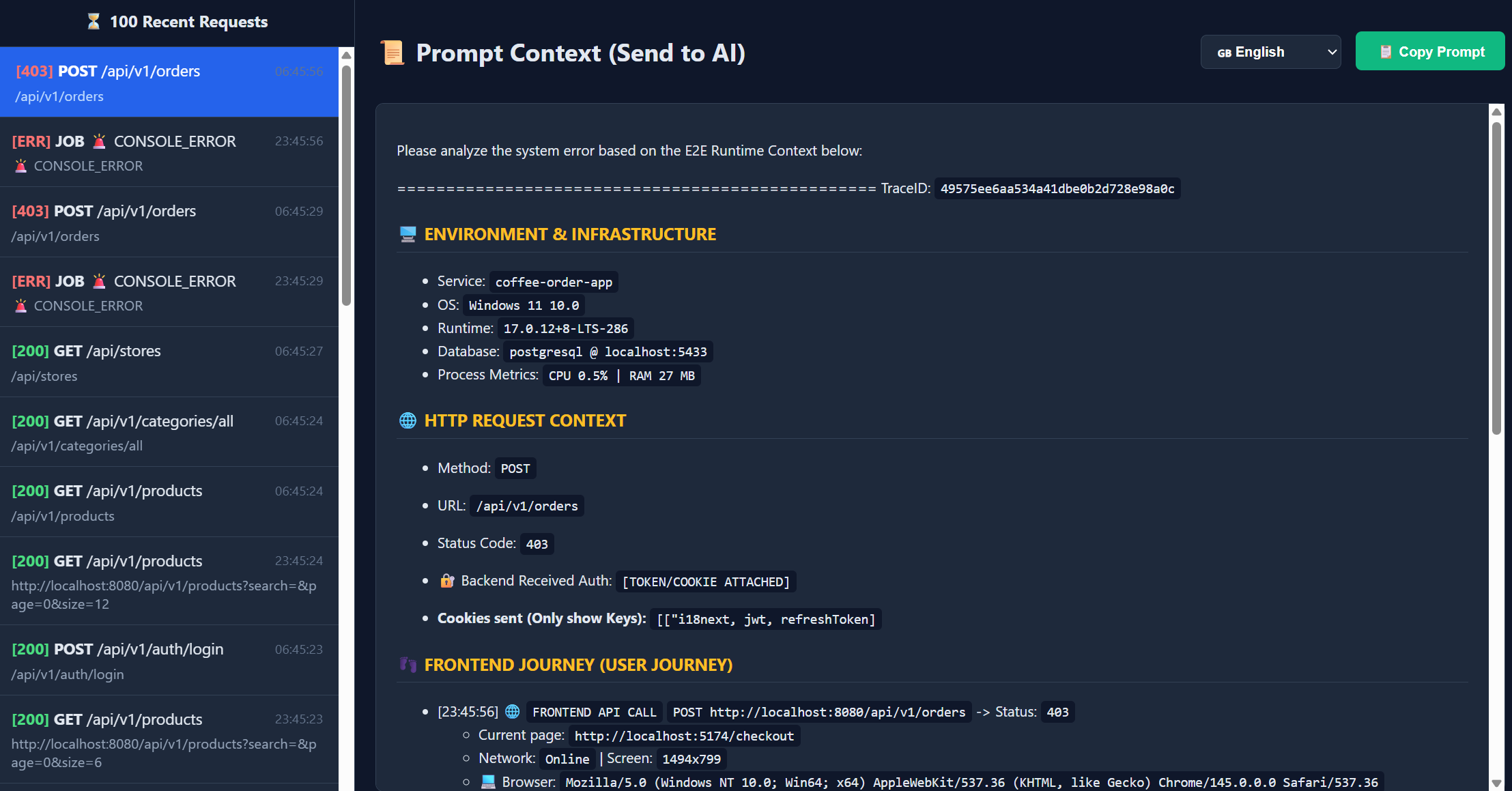
Unlike traditional loggers, Trace2Prompt captures the entire user journey. Here is an example of a complex POST /api/orders request captured by the tool, ready to be sent to AI:
Please analyze the system error based on the E2E Runtime Context below:

=================================================
TraceID: `210f81049b3364bfc84e7f0e72245898`

### 🖥️ ENVIRONMENT & INFRASTRUCTURE

- Service: `coffee-order-app`
- OS: `Windows 11 10.0`
- Runtime: `17.0.12+8-LTS-286`
- Database: `postgresql @ localhost:8080`
- 📊 Process Metrics: `CPU 0.0% | RAM 325 MB`

### 🌐 HTTP REQUEST CONTEXT

- Method: `POST`
- URL: `/api/v1/orders`
- Status Code: `201`
- 🔐 Backend Received Auth: `[TOKEN/COOKIE ATTACHED]`

- **Cookies sent (Only show Keys):** `[["i18next, jwt, refreshToken]`

### 👣 FRONTEND JOURNEY (USER JOURNEY)

- [00:48:35] 🖱️ `CLICK` at `http://localhost:5174/payment` (Element: `[THANH TOÁN] BUTTON.MuiButtonBase-root.MuiButton-root.MuiButton-contained.MuiButton-containedPrimary.MuiButton-sizeLarge.MuiButton-containedSizeLarge.MuiButton-colorPrimary.MuiButton-root.MuiButton-contained.MuiButton-containedPrimary.MuiButton-sizeLarge.MuiButton-containedSizeLarge.MuiButton-colorPrimary.css-79zo2g-MuiButtonBase-root-MuiButton-root`)
- [00:48:35] 🌐 `FRONTEND API CALL` `POST http://localhost:8080/api/v1/orders` -> Status: `201`
  - Current page: `http://localhost:5174/payment`
  - Network: `Online` | Screen: `1494x799`
  - 💻 Browser: `Mozilla/5.0 (Windows NT 10.0; Win64; x64) AppleWebKit/537.36 (KHTML, like Gecko) Chrome/146.0.0.0 Safari/537.36`
  - 🎫 Headers: `{"Accept":"application/json, text/plain, */*","Content-Type":"application/json"}`
  - 🔻 Request Body (Size: 132 B):
    {
    "items": [
    {
    "productVariantId": 4,
    "quantity": 1,
    "price": 35000
    }
    ],
    "couponCode": "",
    "deliveryMethod": "pickup",
    "addressId": null,
    "storeId": 1
    }
  - 🔺 Response Body (Size: 312 B):
    {
    "id": 41,
    "orderDate": "2026-03-22T07:48:34.8314254",
    "status": "PENDING",
    "totalAmount": 37800,
    "items": [
    {
    "productVariantId": 4,
    "productName": "Cappuccino",
    "size": "S",
    "imageUrl": null,
    "quantity": 1,
    "unitPrice": 35000
    }
    ],
    "deliveryMethod": null,
    "user": {
    "id": 3,
    "fullname": "Customer",
    "phone": "[REDACTED]",
    "address": null
    }
    }
- [00:48:35] ℹ️ CONSOLE_LOG: `create order response:  {"id":41,"orderDate":"2026-03-22T07:48:34.8314254","status":"PENDING","totalAmount":37800,"items":[{"productVariantId":4,"productName":"Cappuccino","size":"S","imageUrl":null,"... [Truncated due to excessive length]`
- [00:48:34] 🖱️ `CLICK` at `http://localhost:5174/checkout` (Element: `[Place Order] BUTTON.w-full.bg-amber-600.text-white.py-3.rounded-lg.font-semibold.hover:bg-amber-700.disabled:opacity-50`)
- [00:48:33] 🖱️ `CLICK` at `http://localhost:5174/cart` (Element: `[Proceed to Checkout] BUTTON.w-full.flex.justify-center.items-center.px-6.py-4.border.border-transparent.rounded-full.shadow-sm.text-lg.font-medium.text-white.bg-amber-800.hover:bg-amber-900.transition-transform.transform.hover:scale-105`)
- [00:48:32] 🖱️ `CLICK` at `http://localhost:5174/menu` (Element: `[1] A.relative.p-2.text-amber-200.hover:text-amber-50.transition-colors.duration-200`)
- [00:48:31] 🖱️ `CLICK` at `http://localhost:5174/menu` (Element: `[Add to Cart] BUTTON.mt-4.w-full.bg-amber-600.text-white.py-2.rounded-md.hover:bg-amber-700.transition-colors.disabled:bg-gray-400.disabled:cursor-not-allowed`)
- [00:48:29] 📤 `WS CLOSE` at `ws://localhost:8080/ws/093/o3uq2fjh/websocket`
  - Payload: `Code: 1000`
- [00:48:29] ℹ️ CONSOLE_LOG: `Connection closed to http://localhost:8080/ws`
- [00:48:29] ℹ️ CONSOLE_LOG: `<<< RECEIPT
  receipt-id:close-1
  content-length:0

`

- [00:48:29] ℹ️ CONSOLE_LOG: `Received data`
- [00:48:29] 📥 `WS RECEIVE` at `ws://localhost:8080/ws/093/o3uq2fjh/websocket`
  - Payload: `a["RECEIPT\nreceipt-id:close-1\n\n\u0000"]`
- [00:48:29] 📤 `WS SEND` at `ws://localhost:8080/ws/093/o3uq2fjh/websocket`
  - Payload: `[
  "DISCONNECT\nreceipt:close-1\n\n\u0000"
]`
- [00:48:29] ℹ️ CONSOLE_LOG: `>>> DISCONNECT
  receipt:close-1

`

- [00:48:29] 🖱️ `CLICK` at `http://localhost:5174/orders` (Element: `[Menu] A.px-3.py-2.rounded-md.text-sm.font-medium.transition-colors.duration-200.text-amber-200.hover:text-amber-50.hover:bg-amber-800/50.`)

### 🛤️ BACKEND JOURNEY (LOGS)

- [INFO] [OrderController] Order created successfully
- [INFO] [CustomUserDetailsService] User [EMAIL_HIDDEN] has authorities: [ROLE_CUSTOMER]

### 🛑 BACKEND EXCEPTION STACKTRACE

- (Backend did not throw Exception)

### ⏳ EXECUTION ORDER & SQL (FLAME GRAPH)

- [392 ms] 📦 [coffee-order-app] ⚙️ `POST /api/v1/orders`
  - [5 ms] 📦 [coffee-order-app] ⚙️ `UserRepository.findByEmail`
    - [4 ms] 📦 [coffee-order-app] ⚙️ `SELECT com.coffeeshop.backend.entity.User`
      - [1 ms] 📦 [coffee-order-app] 🗄️ [SQL DB] Query:
        ```sql
        select u1_0.id,u1_0.created_at,u1_0.email,u1_0.fullname,u1_0.password,u1_0.phone,u1_0.role,u1_0.store_id,u1_0.updated_at
        FROM users u1_0
        WHERE u1_0.email=?
        ```
      - [1 ms] 📦 [coffee-order-app] 🗄️ `[SQL DB] testdb`
  - [28 ms] 📦 [coffee-order-app] ⚙️ `Transaction.commit`
    - [2 ms] 📦 [coffee-order-app] 🗄️ [SQL DB] Query:
      ```sql
      update product_stocks set last_updated=?,product_variant_id=?,quantity=?,store_id=?
      WHERE id=?
      ```
  - [60 ms] 📦 [coffee-order-app] ⚙️ `StockHistoryRepository.save`
    - [60 ms] 📦 [coffee-order-app] ⚙️ `Session.persist com.coffeeshop.backend.entity.StockHistory`
      - [10 ms] 📦 [coffee-order-app] 🗄️ [SQL DB] Query:
        ```sql
        insert into stock_history (created_at,created_by,current_quantity,note,product_variant_id,quantity_changed,reason,store_id) values (?,?,?,?,?,?,?,?)
        ```
  - [20 ms] 📦 [coffee-order-app] ⚙️ `OrderRepository.save`
    - [18 ms] 📦 [coffee-order-app] ⚙️ `Session.persist com.coffeeshop.backend.entity.Order`
      - [3 ms] 📦 [coffee-order-app] 🗄️ [SQL DB] Query:
        ```sql
        insert into order_details (created_at,order_id,product_variant_id,quantity,unit_price,updated_at) values (?,?,?,?,?,?)
        ```
      - [6 ms] 📦 [coffee-order-app] 🗄️ [SQL DB] Query:
        ```sql
        insert into orders (created_at,order_date,status,store_id,total_price,updated_at,user_id,voucher_id) values (?,?,?,?,?,?,?,?)
        ```
      - [2 ms] 📦 [coffee-order-app] 🗄️ [SQL DB] Query:
        ```sql
        insert into payments (amount,created_at,order_id,payment_date,payment_method,status,updated_at) values (?,?,?,?,?,?,?)
        ```
  - [1 ms] 📦 [coffee-order-app] 🗄️ [SQL DB] Query:
    ```sql
    select p1_0.id,p1_0.category_id,p1_0.created_at,p1_0.description,p1_0.image_url,p1_0.is_active,p1_0.name,p1_0.updated_at
      FROM products p1_0
      WHERE p1_0.id=?
    ```
  - [5 ms] 📦 [coffee-order-app] ⚙️ `UserRepository.findByEmail`
    - [4 ms] 📦 [coffee-order-app] ⚙️ `SELECT com.coffeeshop.backend.entity.User`
      - [2 ms] 📦 [coffee-order-app] 🗄️ [SQL DB] Query:
        ```sql
        select u1_0.id,u1_0.created_at,u1_0.email,u1_0.fullname,u1_0.password,u1_0.phone,u1_0.role,u1_0.store_id,u1_0.updated_at
        FROM users u1_0
        WHERE u1_0.email=?
        ```
  - [90 ms] 📦 [coffee-order-app] ⚙️ `ProductStockRepository.findAndLockByProductVariantIdAndStoreId`
    - [60 ms] 📦 [coffee-order-app] ⚙️ `SELECT com.coffeeshop.backend.entity.ProductStock`
      - [5 ms] 📦 [coffee-order-app] 🗄️ [SQL DB] Query:
        ```sql
        select ps1_0.id,ps1_0.last_updated,ps1_0.product_variant_id,ps1_0.quantity,ps1_0.store_id
        FROM product_stocks ps1_0
        WHERE ps1_0.product_variant_id=? and ps1_0.store_id=? for no key update
        ```
  - [3 ms] 📦 [coffee-order-app] ⚙️ `ProductVariantRepository.findById`
    - [2 ms] 📦 [coffee-order-app] ⚙️ `Session.find com.coffeeshop.backend.entity.ProductVariant`
      - [2 ms] 📦 [coffee-order-app] 🗄️ [SQL DB] Query:
        ```sql
        select pv1_0.id,pv1_0.created_at,pv1_0.is_active,pv1_0.price,pv1_0.product_id,pv1_0.size,pv1_0.sku,pv1_0.updated_at
        FROM product_variants pv1_0
        WHERE pv1_0.id=?
        ```
  - [15 ms] 📦 [coffee-order-app] ⚙️ `StoreRepository.findById`
    - [9 ms] 📦 [coffee-order-app] ⚙️ `Session.find com.coffeeshop.backend.entity.Store`
      - [3 ms] 📦 [coffee-order-app] 🗄️ [SQL DB] Query:
        ```sql
        select s1_0.id,s1_0.address,s1_0.created_at,s1_0.is_active,s1_0.latitude,s1_0.longitude,s1_0.name,s1_0.phone,s1_0.updated_at
        FROM stores s1_0
        WHERE s1_0.id=?
        ```
  - [11 ms] 📦 [coffee-order-app] ⚙️ `ProductStockRepository.save`
    - [7 ms] 📦 [coffee-order-app] ⚙️ `Session.merge com.coffeeshop.backend.entity.ProductStock`

=================================================
Please analyze the system error based on the E2E Runtime Context below:

=================================================
TraceID: `6464d81b63cbc1de7184d0c90ce53891`

### 🖥️ ENVIRONMENT & INFRASTRUCTURE

- Service: `coffee-order-app`
- OS: `Windows 11 10.0`
- Runtime: `17.0.12+8-LTS-286`
- Database: `redis @ localhost:8080`
- 📊 CPU Usage (At request time): `0.02%`
- 🧠 JVM Memory Used: `18 MB`

### 🌐 HTTP REQUEST CONTEXT

- Method: `GET`
- URL: `/api/v1/products?search=&page=0&size=6`
- Status Code: `200`
- 🔐 Backend Received Auth: `[TOKEN/COOKIE ATTACHED]`

- 🍪 **Attached Cookies (Keys only):** `[["jwt, refreshToken, i18next"]`

### 👣 FRONTEND JOURNEY (USER JOURNEY)

- [22:27:49] 🖱️ `CLICK` at `http://localhost:5174/` (Element: `[Menu] A.px-3.py-2.rounded-md.text-sm.font-medium.transition-colors.duration-200.text-amber-200.hover:text-amber-50.hover:bg-amber-800/50.`)
- [22:27:30] 🌐 `FRONTEND API CALL` `GET http://localhost:8080/api/v1/products?search=&page=0&size=6` -> Status: `200`
  - 📍 Current Page: `http://localhost:5174/`
  - 📶 Network: `Online` | 🖥️ Screen: `1134x799`
  - 💻 Browser: `Mozilla/5.0 (Windows NT 10.0; Win64; x64) AppleWebKit/537.36 (KHTML, like Gecko) Chrome/145.0.0.0 Safari/537.36`
  - 🎫 Headers: `{"Accept":"application/json, text/plain, */*"}`
  - 🔺 Response Body:
    {
    "content": [
    {
    "id": 1,
    "name": "Espresso",
    "description": "Rich and pure espresso shot",
    "imageUrl": "/Espresso.png",
    "category": {
    "id": 2,
    "name": "Espresso"
    },
    "variants": [
    {
    "id": 1,
    "sku": "S-29000",
    "size": "S",
    "price": 29000,
    "stockQuantity": null,
    "isActive": true
    },
    {
    "id": 2,
    "sku": "M-35000",
    "size": "M",
    "price": 35000,
    "stockQuantity": null,
    "isActive": true
    },
    {
    "id": 3,
    "sku": "L-39000",
    "size": "L",
    "price": 39000,
    "stockQuantity": null,
    "isActive": true
    }
    ],
    "isActive": true
    },
    {
    "id": 2,
    "name": "Cappuccino",
    "description": "Espresso topped with foamy milk",
    "imageUrl": "/Cappuccino.png",
    "category": {
    "id": 5,
    "name": "Cappuccino"
    },
    "variants": [
    {
    "id": 4,
    "sku": "S-35000",
    "size": "S",
    "price": 35000,
    "stockQuantity": null,
    "isActive": true
    },
    {
    "id": 5,
    "sku": "M-42000",
    "size": "M",
    "price": 42000,
    "stockQuantity": null,
    "isActive": true
    },
    {
    "id": 6,
    "sku": "L-48000",
    "size": "L",
    "price

    ... [TRUNCATED DUE TO LENGTH]

- [22:27:30] 🖱️ `CLICK` at `http://localhost:5174/checkout` (Element: `[The Coffee Corner] SPAN.text-xl.font-bold.text-amber-50`)
- [22:24:11] 🖱️ `CLICK` at `http://localhost:5174/checkout` (Element: `[PLACE ORDER & PAYMENT] BUTTON.w-full.bg-amber-600.text-white.py-3.5.rounded-lg.font-bold.text-lg.shadow-lg.hover:bg-amber-700.hover:shadow-xl.transition-all.disabled:opacity-50.disabled:cursor-not-allowed`)

### 🛤️ BACKEND JOURNEY (LOGS)

- [INFO] [CustomUserDetailsService] User [EMAIL_HIDDEN] has authorities: [ROLE_STAFF]
- [INFO] [ProductController] Calling getAllProducts with search: , page: 0, size: 6

### 🛑 BACKEND EXCEPTION STACKTRACE

- (Backend did not throw Exception)

### ⏳ EXECUTION ORDER & SQL (FLAME GRAPH)

- [35 ms] ⚙️ `GET /api/v1/products`
  - [9 ms] ⚙️ `UserRepository.findByEmail` - [8 ms] ⚙️ `SELECT com.coffeeshop.backend.entity.User` - [3 ms] 🗄️ [DB] `testdb` - [1 ms] 🗄️ [DB] `SELECT testdb.users` - Query: `select u1_0.id,u1_0.created_at,u1_0.email,u1_0.fullname,u1_0.password,u1_0.phone,u1_0.role,u1_0.store_id,u1_0.updated_at
FROM users u1_0
WHERE u1_0.email=?`
  - # [3 ms] ⚡ [REDIS] `GET` - Redis Command: `GET products::SimpleKey [, Page request [number: 0, size 6, sort: UNSORTED]]`
You can run Trace2Prompt in one of 2 ways:
Method 1: Build with Docker (No Go installation needed)
If you have Docker, you can "borrow" Docker to compile the source code into a local executable cleanly:
git clone https://github.com/thuanDaoSE/trace2prompt.git
cd trace2prompt

# For Mac/Linux:
docker run --rm -v "$(pwd):/app" -w /app golang:latest go build -o trace2prompt .
./trace2prompt

# For Windows (PowerShell):
docker run --rm -v "${PWD}:/app" -w /app golang:latest go build -o trace2prompt.exe .
.\trace2prompt.exe
Method 2: Build with Go (If you have Go installed)
go build -o trace2prompt .
./trace2prompt
(Tool will start listening for logs on port localhost:4318 and open Web UI at http://localhost:4319)
💡 Pro Tip: The startup command is quite long, for daily development convenience, you should save this command to a
run.batfile (for Windows) /run.sh(for Mac/Linux), or put these-Dotel...variable configurations directly intolaunch.json(VS Code) / Run Configuration (IntelliJ)!
Tested & works stably with OTel Agent v2.26.0.
Download OpenTelemetry Java Agent v2.26.0:
curl -L -o opentelemetry-javaagent.jar "https://github.com/open-telemetry/opentelemetry-java-instrumentation/releases/download/v2.26.0/opentelemetry-javaagent.jar"
Trace2Prompt uses the international OpenTelemetry (OTLP) standard, so it supports 100% of all programming languages.
💡 Note about System Architecture:
OTEL_SERVICE_NAME for each one). Trace2Prompt will automatically link (Distributed Tracing) cross-API calls into a complete flow!✅ Backend Verification:
- Start your Backend application.
- Make a simple API request to your Backend (e.g., call a GET endpoint).
- Open the Trace2Prompt Web UI (
http://localhost:4319). If you see the request log appear there, the agent is successfully attached!
👇 Click on your stack below to see integration instructions:
☕ Java (Spring Boot, Quarkus, etc...)java -javaagent:opentelemetry-javaagent.jar "-Dotel.service.name=my-spring-app" "-Dotel.traces.exporter=otlp" "-Dotel.logs.exporter=otlp" "-Dotel.metrics.exporter=otlp" "-Dotel.exporter.otlp.endpoint=http://localhost:4318" "-Dotel.exporter.otlp.protocol=http/protobuf" "-Dotel.instrumentation.http.capture-headers.server.request=Authorization,Cookie,Accept,User-Agent,Content-Type" "-Dotel.instrumentation.http.server.capture-request-headers=Authorization,Cookie,Accept,User-Agent,Content-Type" "-Dotel.bsp.schedule.delay=500" "-Dotel.blrp.schedule.delay=500" -jar your-application.jar
🐧 For Mac/Linux:
Download the opentelemetry-javaagent.jar file and run the following command:
java -javaagent:opentelemetry-javaagent.jar \
  -Dotel.service.name=my-spring-app \
  -Dotel.traces.exporter=otlp \
  -Dotel.logs.exporter=otlp \
  -Dotel.metrics.exporter=otlp \
  -Dotel.exporter.otlp.endpoint=http://localhost:4318 \
  -Dotel.exporter.otlp.protocol=http/protobuf \
  -Dotel.instrumentation.http.capture-headers.server.request=Authorization,Cookie,Accept,User-Agent,Content-Type \
  -Dotel.instrumentation.http.server.capture-request-headers=Authorization,Cookie,Accept,User-Agent,Content-Type \
  -Dotel.bsp.schedule.delay=500 \
  -Dotel.blrp.schedule.delay=500 \
  -jar your-application.jar
Install auto-instrumentation package:
# Install necessary libraries
npm install @opentelemetry/auto-instrumentations-node @opentelemetry/api
Then start the application (with Agent and Full optimal configuration):
# Run application with environment variables identical to Java
env OTEL_SERVICE_NAME="node-backend-app" \
    OTEL_TRACES_EXPORTER="otlp" \
    OTEL_LOGS_EXPORTER="otlp" \
    OTEL_METRICS_EXPORTER="otlp" \
    OTEL_EXPORTER_OTLP_ENDPOINT="http://localhost:4318" \
    OTEL_EXPORTER_OTLP_PROTOCOL="http/protobuf" \
    OTEL_INSTRUMENTATION_HTTP_CAPTURE_HEADERS_SERVER_REQUEST="Authorization,Cookie,Accept,User-Agent,Content-Type" \
    OTEL_BSP_SCHEDULE_DELAY=500 \
    OTEL_BLRP_SCHEDULE_DELAY=500 \
    node --require @opentelemetry/auto-instrumentations-node/register app.js
Use OpenTelemetry's CLI toolkit to automatically install Sensors:
# Install OTel auto-instrumentation tool
pip install opentelemetry-distro opentelemetry-exporter-otlp
opentelemetry-bootstrap -a install
Wrap your Python run command with opentelemetry-instrument:
# Start application with standard configuration
env OTEL_SERVICE_NAME="python-backend-app" \
    OTEL_TRACES_EXPORTER="otlp" \
    OTEL_LOGS_EXPORTER="otlp" \
    OTEL_METRICS_EXPORTER="otlp" \
    OTEL_EXPORTER_OTLP_ENDPOINT="http://localhost:4318" \
    OTEL_EXPORTER_OTLP_PROTOCOL="http/protobuf" \
    OTEL_INSTRUMENTATION_HTTP_CAPTURE_HEADERS_SERVER_REQUEST="Authorization,Cookie,Accept,User-Agent,Content-Type" \
    OTEL_BSP_SCHEDULE_DELAY=500 \
    OTEL_BLRP_SCHEDULE_DELAY=500 \
    opentelemetry-instrument python main.py
With Go, you need to initialize OTel Provider in your main.go file. Refer to Official OpenTelemetry Go Documentation. After configuration, run normally with environment variables:
# Go code will automatically follow standard OS environment variables
export OTEL_SERVICE_NAME="go-backend-app"
export OTEL_EXPORTER_OTLP_ENDPOINT="http://localhost:4318"
export OTEL_EXPORTER_OTLP_PROTOCOL="http/protobuf"
export OTEL_BSP_SCHEDULE_DELAY=500
# ... then run the executable
./my-go-app
Whether you use axios, fetch, or React Query... Trace2Prompt will automatically capture complete E2E Context thanks to Native interception mechanism. Just paste this Script tag into the <head> tag in your project's root index.html file:
<script type="module" src="http://localhost:4319/trace2prompt.js"></script>
✅ Verification: Open your browser's Developer Tools (Press F12 -> Console). If you see the message 🟢 [Trace2Prompt] E2E Sensor FULLY INITIALIZED!, the Frontend is successfully connected.
http://localhost:4319.The project has built-in Model Context Protocol (MCP) server on port 4318.
You can configure IDEs (like Cursor or Claude Desktop) to automatically call Trace2Prompt's get_latest_error_trace tool after test failures. At this point, AI will automatically read E2E Trace, diagnose issues, and fix code completely automatically (Autonomous Agent Workflow)!
⚠️ Note: This Agentic Workflow feature is in Beta phase, you can customize MCP to work with your workflow as desired.
Open source lives thanks to the community. All code optimization ideas, bug reports (Issues), or Pull Requests are appreciated!
This project is distributed under the MIT License.

